Last Updated: May 29th, 2025
Cui et al. (2024) studied the impact of generative AI on productivity.
RR extension
R extension
R extension
languageserver
languageserver
languageserver
codv
overview.R
overview.R
tidyverse
tidyverse
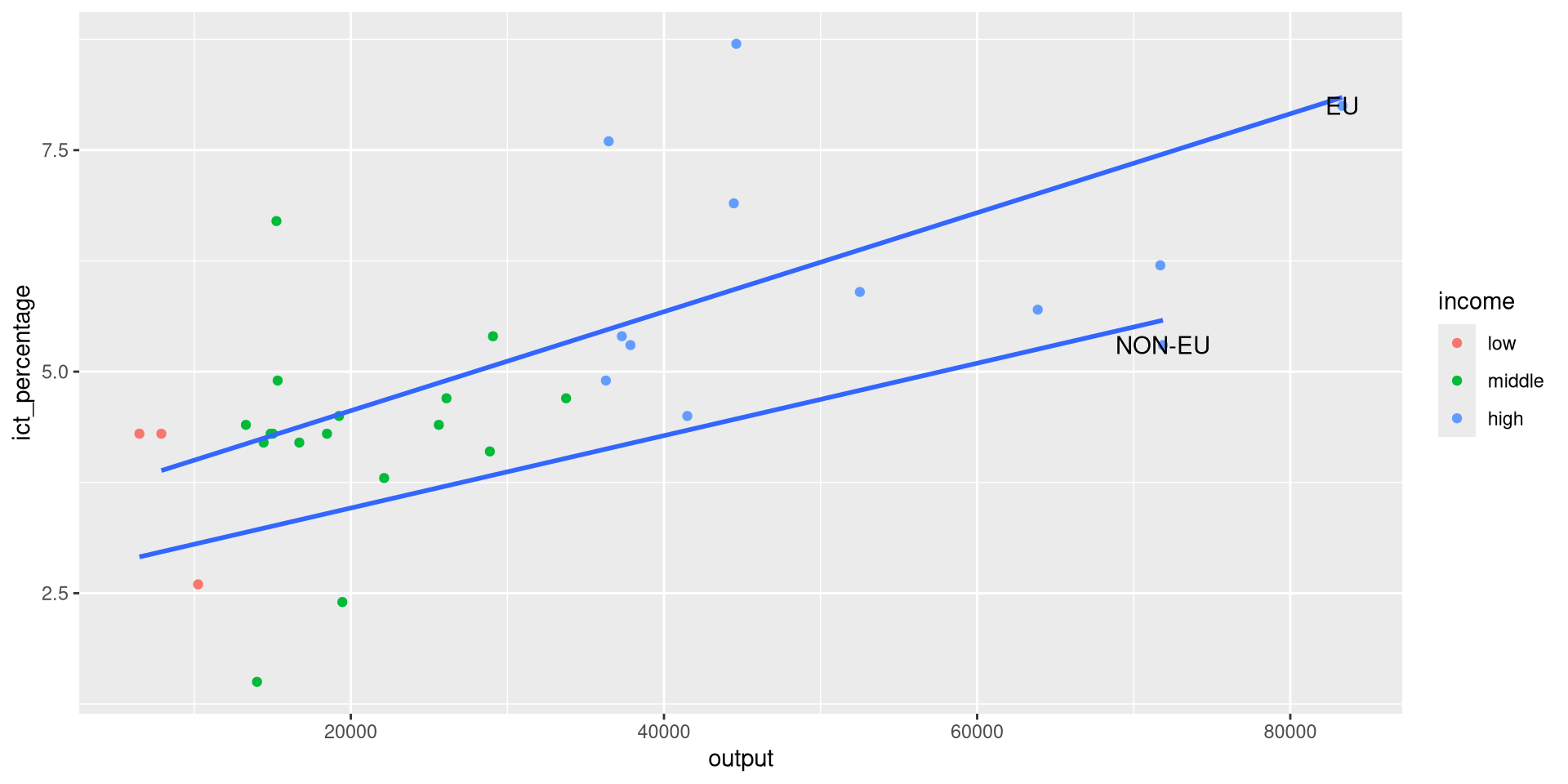
R, datasets are stored as data frames. A data frame is a rectangular arrangement of data. The columns correspond to data variables, and the rows correspond to observations.tidyverse ecosystem.eu_ict data frame contains GDP values and occupation percentages in the ICT sector in 32 EU and non-EU countries for the year 2023.ggplot2 to visualize the data.ggplot2 package is a flexible plotting system for R based on the grammar of graphics.mapping argument.aes() function.aes stands for aesthetics.aes stands for aesthetics.aes stands for aesthetics.x and y arguments specify the variables to be plotted on the horizontal and vertical axes, respectively.+ operator.R terminal changes the prompt from > to +.R interpreter is waiting for more input.geom_point() function to add a scatter plot.ggplot2, starting with geom_, that add different types of layers.geom_line(), geom_bar(), geom_boxplot(), etc.geom_point() function to add a scatter plot.geom prefix stands for geometric object.geom_point() function to add a scatter plot.geom prefix stands for geometric object.point suffix specifies we want to represent the data as points.geom_point() function to add a scatter plot.geom_ family.geom_line gives geometric representations of the data as lines.EU variable of the eu_ict data frame is a categorical variable.EU variable of the eu_ict data frame is a categorical variable.R are stored as factors.EU variable of the eu_ict data frame is a categorical variable.R are stored as factors.EU variable of the eu_ict data frame is a categorical variable.R are stored as factors.EU factor variable has two levels: EU and non-EU.+ operator.geom_smooth to add fitted lines.geom_smooth to add fitted lines.geom_smooth can be used for adding different types of fitted lines.method argument specifies the type of the fitted line.method = "lm" for linear (model) fitted line.aes() to define aesthetics for each geometric object.ggplot(
data = eu_ict,
mapping = aes(x = output, y = ict_percentage)
) +
geom_point(mapping = aes(color = EU, shape = EU)) +
geom_smooth(method = "lm") +
labs(
title = "ICT employment and Output",
subtitle = "EU27 vs. non-EU27 countries",
x = "Output per capita (EUR)",
y = "ICT employment (percentage of total employment)",
color = "Membership",
shape = "Membership"
)labs() function to add titles and labels.labs().ggplot(
data = eu_ict,
mapping = aes(x = output, y = ict_percentage)
) +
geom_point(mapping = aes(color = EU, shape = EU)) +
geom_smooth(method = "lm") +
labs(
title = "ICT employment and Output",
subtitle = "EU27 vs. non-EU27 countries",
x = "Output per capita (EUR)",
y = "ICT employment (percentage of total employment)",
color = "Membership",
shape = "Membership"
)
ggplot(
data = eu_ict,
mapping = aes(x = output, y = ict_percentage)
) +
geom_point(mapping = aes(color = EU, shape = EU)) +
geom_smooth(method = "lm") +
labs(
title = "ICT employment and Output",
subtitle = "EU27 vs. non-EU27 countries",
x = "Output per capita (EUR)",
y = "ICT employment (percentage of total employment)",
color = "Membership",
shape = "Membership"
)
ggplot(
data = eu_ict,
mapping = aes(x = output, y = ict_percentage)
) +
geom_point(mapping = aes(color = EU, shape = EU)) +
geom_smooth(method = "lm") +
labs(
title = "ICT employment and Output",
subtitle = "EU27 vs. non-EU27 countries",
x = "Output per capita (EUR)",
y = "ICT employment (percentage of total employment)",
color = "Membership",
shape = "Membership"
)
ggplot(
data = eu_ict,
mapping = aes(x = output, y = ict_percentage)
) +
geom_point(mapping = aes(color = EU, shape = EU)) +
geom_smooth(method = "lm") +
labs(
title = "ICT employment and Output",
subtitle = "EU27 vs. non-EU27 countries",
x = "Output per capita (EUR)",
y = "ICT employment (percentage of total employment)",
color = "Membership",
shape = "Membership"
)
ggplot(
data = eu_ict,
mapping = aes(x = output, y = ict_percentage)
) +
geom_point(mapping = aes(color = EU, shape = EU)) +
geom_smooth(method = "lm") +
labs(
title = "ICT employment and Output",
subtitle = "EU27 vs. non-EU27 countries",
x = "Output per capita (EUR)",
y = "ICT employment (percentage of total employment)",
color = "Membership",
shape = "Membership"
)
ggplot(
data = eu_ict,
mapping = aes(x = output, y = ict_percentage)
) +
geom_point(mapping = aes(color = EU, shape = EU)) +
geom_smooth(method = "lm") +
labs(
title = "ICT employment and Output",
subtitle = "EU27 vs. non-EU27 countries",
x = "Output per capita (EUR)",
y = "ICT employment (percentage of total employment)",
color = "Membership",
shape = "Membership"
) +
scale_color_grey()scale_color_grey() function.scale_color_brewer(), scale_color_continuous(), scale_color_colorblind(), etc.ggplot(
data = eu_ict,
mapping = aes(x = output, y = ict_percentage)
) +
geom_point(mapping = aes(color = EU, shape = EU)) +
geom_smooth(method = "lm") +
labs(
title = "ICT employment and Output",
subtitle = "EU27 vs. non-EU27 countries",
x = "Output per capita (EUR)",
y = "ICT employment (percentage of total employment)",
color = "Membership",
shape = "Membership"
) +
scale_color_grey()
scale_color_grey() function did not recolor the fitted line (why?).ggplot(
data = eu_ict,
mapping = aes(x = output, y = ict_percentage)
) +
geom_point(mapping = aes(color = EU, shape = EU)) +
geom_smooth(method = "lm", color = "darkgray") +
labs(
title = "ICT employment and Output",
subtitle = "EU27 vs. non-EU27 countries",
x = "Output per capita (EUR)",
y = "ICT employment (percentage of total employment)",
color = "Membership",
shape = "Membership"
) +
scale_color_grey()
income variable in the eu_ict dataset.income variable in the eu_ict dataset.ggplot2 that we want to use the income using aes().x and y aesthetics.income variable in the eu_ict dataset.ggplot2 that we wish to create a bar plot using the geom_bar() function.income variable in the eu_ict dataset.income variable is categorical and has three levels: low, middle, and high.aes() call.output variable.geom_histogram() to create a histogram of a continuous variable.output variable.output variable.geom_histogram() function uses 30 bins.output variable.bins argument of the geom_histogram() function to change the default behavior.output variable.geom_density() to create a density plot.

income variable we created earlier displays the levels in the order they appear in the data.fct_infreq.fct_infreq function reorders the levels of a factor based on their frequency.fct_inorder, which orders levels in the order they appear in the data, and fct_inseq, which orders levels by the numeric value of their levels.fct_ family of functions is part of the forcats package (part of the tidyverse).forcats package to use these functions.income levels by eu countries in the eu_ict dataset.EU categorical variable does not provide income information.income levels by eu countries in the eu_ict dataset.income levels by eu countries in the eu_ict dataset.ggplot2 to color the bars by the income variable.income levels by eu countries in the eu_ict dataset.fill aesthetic to income will color each bar according to the number of countries in each income level.income levels by eu countries in the eu_ict dataset.income level shares by eu countries in the eu_ict dataset.EU membership is very unbalanced.income level shares by eu countries in the eu_ict dataset.EU countries than NON-EU countries in the dataset, making comparisons challenging.income level shares by eu countries in the eu_ict dataset.ggplot2 to normalize the bar heights and color by the income shares within each EU membership category.income level shares by eu countries in the eu_ict dataset.position argument of the geom_bar() function to fill.income level shares by eu countries in the eu_ict dataset.ict_percentage per income group.ict_percentage using the geom_density() function.ggplot2 to colorize based on income using the color aesthetic.ict_percentage per income group.fill aesthetic instead of or alongside color.ict_percentage per income group.
fill aesthetic instead of or alongside color.ict_percentage per income group.
alpha (transparency) value to the geom_density() function to make the plot more readable.ict_percentage per income group.
alpha (transparency) value to the geom_density() function to make the plot more readable.alpha value ranges from 0 (completely transparent) to 1 (completely opaque).ict_percentage per income group.ict_percentage per income group.ict_percentage per income group.ict_percentage per income group.ggplot2 define outliers as values that are more than 1.5 times the IQR below the first quartile or above the third quartile.ict_percentage per income group.ggplot2 uses the geom_boxplot function.x and y aesthetics to define the variables to be plotted.ict_percentage per income group.
Ekphrasis is a vivid verbal description of, or meditation upon, a non-verbal work of art, real or imagined, usually a painting or sculpture (Baldick 2008)

However, opioids are known to have a series of serious side effects


eu_ict dataset to create various visualizations.eu_ict dataset from scratch.R.dplyr and tidyr packages to perform data transformations.dplyr package provides three main types of data transformations:
tidyr package provides two main types of data transformations:
eu_ict dataset combines data from three Eurostat datasets:
readr package to read the data from the original sources.sdg data frame.# A tibble: 1,845 × 9
DATAFLOW `LAST UPDATE` freq unit na_item geo TIME_PERIOD OBS_VALUE
<chr> <chr> <chr> <chr> <chr> <chr> <dbl> <dbl>
1 ESTAT:SDG_08_1… 20/12/24 11:… Annu… Chai… Gross … Alba… 2000 1700
2 ESTAT:SDG_08_1… 20/12/24 11:… Annu… Chai… Gross … Alba… 2001 1850
3 ESTAT:SDG_08_1… 20/12/24 11:… Annu… Chai… Gross … Alba… 2002 1940
4 ESTAT:SDG_08_1… 20/12/24 11:… Annu… Chai… Gross … Alba… 2003 2060
5 ESTAT:SDG_08_1… 20/12/24 11:… Annu… Chai… Gross … Alba… 2004 2180
6 ESTAT:SDG_08_1… 20/12/24 11:… Annu… Chai… Gross … Alba… 2005 2310
7 ESTAT:SDG_08_1… 20/12/24 11:… Annu… Chai… Gross … Alba… 2006 2460
8 ESTAT:SDG_08_1… 20/12/24 11:… Annu… Chai… Gross … Alba… 2007 2630
9 ESTAT:SDG_08_1… 20/12/24 11:… Annu… Chai… Gross … Alba… 2008 2850
10 ESTAT:SDG_08_1… 20/12/24 11:… Annu… Chai… Gross … Alba… 2009 2960
# ℹ 1,835 more rows
# ℹ 1 more variable: OBS_FLAG <chr>
tibble’s from standard output# A tibble: 1,845 × 9
DATAFLOW `LAST UPDATE` freq unit na_item geo TIME_PERIOD OBS_VALUE
<chr> <chr> <chr> <chr> <chr> <chr> <dbl> <dbl>
1 ESTAT:SDG_08_1… 20/12/24 11:… Annu… Chai… Gross … Alba… 2000 1700
2 ESTAT:SDG_08_1… 20/12/24 11:… Annu… Chai… Gross … Alba… 2001 1850
3 ESTAT:SDG_08_1… 20/12/24 11:… Annu… Chai… Gross … Alba… 2002 1940
4 ESTAT:SDG_08_1… 20/12/24 11:… Annu… Chai… Gross … Alba… 2003 2060
5 ESTAT:SDG_08_1… 20/12/24 11:… Annu… Chai… Gross … Alba… 2004 2180
6 ESTAT:SDG_08_1… 20/12/24 11:… Annu… Chai… Gross … Alba… 2005 2310
7 ESTAT:SDG_08_1… 20/12/24 11:… Annu… Chai… Gross … Alba… 2006 2460
8 ESTAT:SDG_08_1… 20/12/24 11:… Annu… Chai… Gross … Alba… 2007 2630
9 ESTAT:SDG_08_1… 20/12/24 11:… Annu… Chai… Gross … Alba… 2008 2850
10 ESTAT:SDG_08_1… 20/12/24 11:… Annu… Chai… Gross … Alba… 2009 2960
# ℹ 1,835 more rows
# ℹ 1 more variable: OBS_FLAG <chr>
sdg is stored as a tibble.tibble’s from standard output# A tibble: 1,845 × 9
DATAFLOW `LAST UPDATE` freq unit na_item geo TIME_PERIOD OBS_VALUE
<chr> <chr> <chr> <chr> <chr> <chr> <dbl> <dbl>
1 ESTAT:SDG_08_1… 20/12/24 11:… Annu… Chai… Gross … Alba… 2000 1700
2 ESTAT:SDG_08_1… 20/12/24 11:… Annu… Chai… Gross … Alba… 2001 1850
3 ESTAT:SDG_08_1… 20/12/24 11:… Annu… Chai… Gross … Alba… 2002 1940
4 ESTAT:SDG_08_1… 20/12/24 11:… Annu… Chai… Gross … Alba… 2003 2060
5 ESTAT:SDG_08_1… 20/12/24 11:… Annu… Chai… Gross … Alba… 2004 2180
6 ESTAT:SDG_08_1… 20/12/24 11:… Annu… Chai… Gross … Alba… 2005 2310
7 ESTAT:SDG_08_1… 20/12/24 11:… Annu… Chai… Gross … Alba… 2006 2460
8 ESTAT:SDG_08_1… 20/12/24 11:… Annu… Chai… Gross … Alba… 2007 2630
9 ESTAT:SDG_08_1… 20/12/24 11:… Annu… Chai… Gross … Alba… 2008 2850
10 ESTAT:SDG_08_1… 20/12/24 11:… Annu… Chai… Gross … Alba… 2009 2960
# ℹ 1,835 more rows
# ℹ 1 more variable: OBS_FLAG <chr>
tibble’s from standard output# A tibble: 1,845 × 9
DATAFLOW `LAST UPDATE` freq unit na_item geo TIME_PERIOD OBS_VALUE
<chr> <chr> <chr> <chr> <chr> <chr> <dbl> <dbl>
1 ESTAT:SDG_08_1… 20/12/24 11:… Annu… Chai… Gross … Alba… 2000 1700
2 ESTAT:SDG_08_1… 20/12/24 11:… Annu… Chai… Gross … Alba… 2001 1850
3 ESTAT:SDG_08_1… 20/12/24 11:… Annu… Chai… Gross … Alba… 2002 1940
4 ESTAT:SDG_08_1… 20/12/24 11:… Annu… Chai… Gross … Alba… 2003 2060
5 ESTAT:SDG_08_1… 20/12/24 11:… Annu… Chai… Gross … Alba… 2004 2180
6 ESTAT:SDG_08_1… 20/12/24 11:… Annu… Chai… Gross … Alba… 2005 2310
7 ESTAT:SDG_08_1… 20/12/24 11:… Annu… Chai… Gross … Alba… 2006 2460
8 ESTAT:SDG_08_1… 20/12/24 11:… Annu… Chai… Gross … Alba… 2007 2630
9 ESTAT:SDG_08_1… 20/12/24 11:… Annu… Chai… Gross … Alba… 2008 2850
10 ESTAT:SDG_08_1… 20/12/24 11:… Annu… Chai… Gross … Alba… 2009 2960
# ℹ 1,835 more rows
# ℹ 1 more variable: OBS_FLAG <chr>
tibble’s from standard output# A tibble: 1,845 × 9
DATAFLOW `LAST UPDATE` freq unit na_item geo TIME_PERIOD OBS_VALUE
<chr> <chr> <chr> <chr> <chr> <chr> <dbl> <dbl>
1 ESTAT:SDG_08_1… 20/12/24 11:… Annu… Chai… Gross … Alba… 2000 1700
2 ESTAT:SDG_08_1… 20/12/24 11:… Annu… Chai… Gross … Alba… 2001 1850
3 ESTAT:SDG_08_1… 20/12/24 11:… Annu… Chai… Gross … Alba… 2002 1940
4 ESTAT:SDG_08_1… 20/12/24 11:… Annu… Chai… Gross … Alba… 2003 2060
5 ESTAT:SDG_08_1… 20/12/24 11:… Annu… Chai… Gross … Alba… 2004 2180
6 ESTAT:SDG_08_1… 20/12/24 11:… Annu… Chai… Gross … Alba… 2005 2310
7 ESTAT:SDG_08_1… 20/12/24 11:… Annu… Chai… Gross … Alba… 2006 2460
8 ESTAT:SDG_08_1… 20/12/24 11:… Annu… Chai… Gross … Alba… 2007 2630
9 ESTAT:SDG_08_1… 20/12/24 11:… Annu… Chai… Gross … Alba… 2008 2850
10 ESTAT:SDG_08_1… 20/12/24 11:… Annu… Chai… Gross … Alba… 2009 2960
# ℹ 1,835 more rows
# ℹ 1 more variable: OBS_FLAG <chr>
tibble’s from standard output# A tibble: 1,845 × 9
DATAFLOW `LAST UPDATE` freq unit na_item geo TIME_PERIOD OBS_VALUE
<chr> <chr> <chr> <chr> <chr> <chr> <dbl> <dbl>
1 ESTAT:SDG_08_1… 20/12/24 11:… Annu… Chai… Gross … Alba… 2000 1700
2 ESTAT:SDG_08_1… 20/12/24 11:… Annu… Chai… Gross … Alba… 2001 1850
3 ESTAT:SDG_08_1… 20/12/24 11:… Annu… Chai… Gross … Alba… 2002 1940
4 ESTAT:SDG_08_1… 20/12/24 11:… Annu… Chai… Gross … Alba… 2003 2060
5 ESTAT:SDG_08_1… 20/12/24 11:… Annu… Chai… Gross … Alba… 2004 2180
6 ESTAT:SDG_08_1… 20/12/24 11:… Annu… Chai… Gross … Alba… 2005 2310
7 ESTAT:SDG_08_1… 20/12/24 11:… Annu… Chai… Gross … Alba… 2006 2460
8 ESTAT:SDG_08_1… 20/12/24 11:… Annu… Chai… Gross … Alba… 2007 2630
9 ESTAT:SDG_08_1… 20/12/24 11:… Annu… Chai… Gross … Alba… 2008 2850
10 ESTAT:SDG_08_1… 20/12/24 11:… Annu… Chai… Gross … Alba… 2009 2960
# ℹ 1,835 more rows
# ℹ 1 more variable: OBS_FLAG <chr>
tibble’s from standard output# A tibble: 1,845 × 9
DATAFLOW `LAST UPDATE` freq unit na_item geo TIME_PERIOD OBS_VALUE
<chr> <chr> <chr> <chr> <chr> <chr> <dbl> <dbl>
1 ESTAT:SDG_08_1… 20/12/24 11:… Annu… Chai… Gross … Alba… 2000 1700
2 ESTAT:SDG_08_1… 20/12/24 11:… Annu… Chai… Gross … Alba… 2001 1850
3 ESTAT:SDG_08_1… 20/12/24 11:… Annu… Chai… Gross … Alba… 2002 1940
4 ESTAT:SDG_08_1… 20/12/24 11:… Annu… Chai… Gross … Alba… 2003 2060
5 ESTAT:SDG_08_1… 20/12/24 11:… Annu… Chai… Gross … Alba… 2004 2180
6 ESTAT:SDG_08_1… 20/12/24 11:… Annu… Chai… Gross … Alba… 2005 2310
7 ESTAT:SDG_08_1… 20/12/24 11:… Annu… Chai… Gross … Alba… 2006 2460
8 ESTAT:SDG_08_1… 20/12/24 11:… Annu… Chai… Gross … Alba… 2007 2630
9 ESTAT:SDG_08_1… 20/12/24 11:… Annu… Chai… Gross … Alba… 2008 2850
10 ESTAT:SDG_08_1… 20/12/24 11:… Annu… Chai… Gross … Alba… 2009 2960
# ℹ 1,835 more rows
# ℹ 1 more variable: OBS_FLAG <chr>
tibble’s from standard output# A tibble: 1,845 × 9
DATAFLOW `LAST UPDATE` freq unit na_item geo TIME_PERIOD OBS_VALUE
<chr> <chr> <chr> <chr> <chr> <chr> <dbl> <dbl>
1 ESTAT:SDG_08_1… 20/12/24 11:… Annu… Chai… Gross … Alba… 2000 1700
2 ESTAT:SDG_08_1… 20/12/24 11:… Annu… Chai… Gross … Alba… 2001 1850
3 ESTAT:SDG_08_1… 20/12/24 11:… Annu… Chai… Gross … Alba… 2002 1940
4 ESTAT:SDG_08_1… 20/12/24 11:… Annu… Chai… Gross … Alba… 2003 2060
5 ESTAT:SDG_08_1… 20/12/24 11:… Annu… Chai… Gross … Alba… 2004 2180
6 ESTAT:SDG_08_1… 20/12/24 11:… Annu… Chai… Gross … Alba… 2005 2310
7 ESTAT:SDG_08_1… 20/12/24 11:… Annu… Chai… Gross … Alba… 2006 2460
8 ESTAT:SDG_08_1… 20/12/24 11:… Annu… Chai… Gross … Alba… 2007 2630
9 ESTAT:SDG_08_1… 20/12/24 11:… Annu… Chai… Gross … Alba… 2008 2850
10 ESTAT:SDG_08_1… 20/12/24 11:… Annu… Chai… Gross … Alba… 2009 2960
# ℹ 1,835 more rows
# ℹ 1 more variable: OBS_FLAG <chr>
unit, geo, TIME_PERIOD, OBS_VALUE, and OBS_FLAG contain information of interest.DATAFLOW, LAST UPDATE, freq, and na_item contain metadata and have no variation within the dataset.DATAFLOW, LAST UPDATE, freq, and na_item contain metadata and have no variation within the dataset.dplyr function distinct(), and, at the same time, perform our first data transformation operation.distinct() returns the rows of the data frame with unique combinations of the specified columns.distinct() is the data frame.DATAFLOW and LAST UPDATE values in the sdg dataset.distinct()’s resultdistinct() contains only the specified columns.distinct() to keep all columns by using the .keep_all argument.distinct() returns the first row of each unique combination of the specified columns.distinct()’s result# A tibble: 1 × 9
DATAFLOW `LAST UPDATE` freq unit na_item geo TIME_PERIOD OBS_VALUE
<chr> <chr> <chr> <chr> <chr> <chr> <dbl> <dbl>
1 ESTAT:SDG_08_10… 20/12/24 11:… Annu… Chai… Gross … Alba… 2000 1700
# ℹ 1 more variable: OBS_FLAG <chr>
distinct() to keep all columns by using the .keep_all argument.distinct() returns the first row of each unique combination of the specified columns.distinct()’s argumentsdistinct() call, the LAST UPDATE column is enclosed in backticks.LAST UPDATE column name contains a space.R cannot contain spaces.R.distinct()’s argumentsdistinct() call, the LAST UPDATE column is enclosed in backticks.dplyr calls or other R operations.distinct() using the usual parenthesized notation.dplyr functions is by using the pipe operator |>.DATAFLOW, LAST UPDATE, freq, and na_item are not very relevant for our analysis.select() function to keep only the variables we are interested in.select() function to keep only the variables we are interested in.# A tibble: 1,845 × 5
unit geo TIME_PERIOD OBS_VALUE OBS_FLAG
<chr> <chr> <dbl> <dbl> <chr>
1 Chain linked volumes (2010), euro per c… Alba… 2000 1700 <NA>
2 Chain linked volumes (2010), euro per c… Alba… 2001 1850 <NA>
3 Chain linked volumes (2010), euro per c… Alba… 2002 1940 <NA>
4 Chain linked volumes (2010), euro per c… Alba… 2003 2060 <NA>
5 Chain linked volumes (2010), euro per c… Alba… 2004 2180 <NA>
6 Chain linked volumes (2010), euro per c… Alba… 2005 2310 <NA>
7 Chain linked volumes (2010), euro per c… Alba… 2006 2460 <NA>
8 Chain linked volumes (2010), euro per c… Alba… 2007 2630 <NA>
9 Chain linked volumes (2010), euro per c… Alba… 2008 2850 d
10 Chain linked volumes (2010), euro per c… Alba… 2009 2960 <NA>
# ℹ 1,835 more rows
select() function.R, we concatenate objects using the c() function.select() function.# A tibble: 1,845 × 5
unit geo TIME_PERIOD OBS_VALUE OBS_FLAG
<chr> <chr> <dbl> <dbl> <chr>
1 Chain linked volumes (2010), euro per c… Alba… 2000 1700 <NA>
2 Chain linked volumes (2010), euro per c… Alba… 2001 1850 <NA>
3 Chain linked volumes (2010), euro per c… Alba… 2002 1940 <NA>
4 Chain linked volumes (2010), euro per c… Alba… 2003 2060 <NA>
5 Chain linked volumes (2010), euro per c… Alba… 2004 2180 <NA>
6 Chain linked volumes (2010), euro per c… Alba… 2005 2310 <NA>
7 Chain linked volumes (2010), euro per c… Alba… 2006 2460 <NA>
8 Chain linked volumes (2010), euro per c… Alba… 2007 2630 <NA>
9 Chain linked volumes (2010), euro per c… Alba… 2008 2850 d
10 Chain linked volumes (2010), euro per c… Alba… 2009 2960 <NA>
# ℹ 1,835 more rows
select() function.c() is superfluous.# A tibble: 1,845 × 5
unit geo TIME_PERIOD OBS_VALUE OBS_FLAG
<chr> <chr> <dbl> <dbl> <chr>
1 Chain linked volumes (2010), euro per c… Alba… 2000 1700 <NA>
2 Chain linked volumes (2010), euro per c… Alba… 2001 1850 <NA>
3 Chain linked volumes (2010), euro per c… Alba… 2002 1940 <NA>
4 Chain linked volumes (2010), euro per c… Alba… 2003 2060 <NA>
5 Chain linked volumes (2010), euro per c… Alba… 2004 2180 <NA>
6 Chain linked volumes (2010), euro per c… Alba… 2005 2310 <NA>
7 Chain linked volumes (2010), euro per c… Alba… 2006 2460 <NA>
8 Chain linked volumes (2010), euro per c… Alba… 2007 2630 <NA>
9 Chain linked volumes (2010), euro per c… Alba… 2008 2850 d
10 Chain linked volumes (2010), euro per c… Alba… 2009 2960 <NA>
# ℹ 1,835 more rows
select()’s resultsselect() function operates on the columns of a data frame.nrow() function, which returns the number of rows in a data frame.TIME_PERIOD is among the variables we selected.year?rename()rename() function of package dplyr can be used to rename variables.=.=.rename()rename() function of package dplyr can be used to rename variables.# A tibble: 1,845 × 5
unit geo year OBS_VALUE OBS_FLAG
<chr> <chr> <dbl> <dbl> <chr>
1 Chain linked volumes (2010), euro per capita Albania 2000 1700 <NA>
2 Chain linked volumes (2010), euro per capita Albania 2001 1850 <NA>
3 Chain linked volumes (2010), euro per capita Albania 2002 1940 <NA>
4 Chain linked volumes (2010), euro per capita Albania 2003 2060 <NA>
5 Chain linked volumes (2010), euro per capita Albania 2004 2180 <NA>
6 Chain linked volumes (2010), euro per capita Albania 2005 2310 <NA>
7 Chain linked volumes (2010), euro per capita Albania 2006 2460 <NA>
8 Chain linked volumes (2010), euro per capita Albania 2007 2630 <NA>
9 Chain linked volumes (2010), euro per capita Albania 2008 2850 d
10 Chain linked volumes (2010), euro per capita Albania 2009 2960 <NA>
# ℹ 1,835 more rows
rename()rename() to rename multiple variables at once.TIME_PERIOD and OBS_FLAG to year and flag, respectively.rename()rename() to rename multiple variables at once.sdg |>
select(unit, geo, TIME_PERIOD, OBS_VALUE, OBS_FLAG) |>
rename(year = TIME_PERIOD, flag = OBS_FLAG)# A tibble: 1,845 × 5
unit geo year OBS_VALUE flag
<chr> <chr> <dbl> <dbl> <chr>
1 Chain linked volumes (2010), euro per capita Albania 2000 1700 <NA>
2 Chain linked volumes (2010), euro per capita Albania 2001 1850 <NA>
3 Chain linked volumes (2010), euro per capita Albania 2002 1940 <NA>
4 Chain linked volumes (2010), euro per capita Albania 2003 2060 <NA>
5 Chain linked volumes (2010), euro per capita Albania 2004 2180 <NA>
6 Chain linked volumes (2010), euro per capita Albania 2005 2310 <NA>
7 Chain linked volumes (2010), euro per capita Albania 2006 2460 <NA>
8 Chain linked volumes (2010), euro per capita Albania 2007 2630 <NA>
9 Chain linked volumes (2010), euro per capita Albania 2008 2850 d
10 Chain linked volumes (2010), euro per capita Albania 2009 2960 <NA>
# ℹ 1,835 more rows
unit variable in the resulting data frame, we observe it takes two distinct values.sdg |>
select(unit, geo, TIME_PERIOD, OBS_VALUE, OBS_FLAG) |>
rename(year = TIME_PERIOD, flag = OBS_FLAG) |>
distinct(unit)# A tibble: 2 × 1
unit
<chr>
1 Chain linked volumes (2010), euro per capita
2 Chain linked volumes, percentage change on previous period, per capita
mutate()The dplyr’s mutate() function allows us to modify existing variables or create new variables based on the existing ones.
We can use mutate() by passing one or more keyword arguments that specify the desired transformations.
mutate() transformationunit such that:
mutate() transformationunit such that for each value \(x\)
mutate() transformationR!grepl()R function grepl() to check if a value contains the word “percentage”.pattern that specifies the word we are looking for, andx that specifies the value we are examining.TRUE if the pattern is found, and FALSE otherwise.grepl()[1] FALSE
[1] TRUE
grepl()grepl(), we can rewrite our pseudocode in syntactically valid R code:if-else control structure, which cannot be directly used in mutate().ifelse()R function ifelse(), which provides a functional form of the if-else control structure.TRUE.FALSE.ifelse()ifelse()grepl() and ifelse combined, we can rewrite our pseudocode in a single-line syntactically valid R code:mutate() transformationmutate() to simplify the values of the unit variable.mutate() function receives a keyword argument that specifies the transformation we want to perform.rename(), the new name or the modified variable name is at the left-hand side of =.= and can use one or more existing variables.mutate() transformationsdg |>
select(unit, geo, TIME_PERIOD, OBS_VALUE, OBS_FLAG) |>
rename(year = TIME_PERIOD, flag = OBS_FLAG) |>
mutate(unit = ifelse(grepl("percentage", unit), "growth", "output"))# A tibble: 1,845 × 5
unit geo year OBS_VALUE flag
<chr> <chr> <dbl> <dbl> <chr>
1 output Albania 2000 1700 <NA>
2 output Albania 2001 1850 <NA>
3 output Albania 2002 1940 <NA>
4 output Albania 2003 2060 <NA>
5 output Albania 2004 2180 <NA>
6 output Albania 2005 2310 <NA>
7 output Albania 2006 2460 <NA>
8 output Albania 2007 2630 <NA>
9 output Albania 2008 2850 d
10 output Albania 2009 2960 <NA>
# ℹ 1,835 more rows
range() to find the range of years in the dataset.sdg |>
select(unit, geo, TIME_PERIOD, OBS_VALUE, OBS_FLAG) |>
rename(year = TIME_PERIOD, flag = OBS_FLAG) |>
mutate(unit = ifelse(grepl("percentage", unit), "growth", "output")) |>
distinct(year) |>
range()[1] 2000 2023
filter()filter() function of the dplyr package can be used to filter rows.TRUE, the row is kept.RR can be specified using the following operators:
== (equal to)!= (not equal to)> (greater than)>= (greater than or equal to)< (less than)<= (less than or equal to)year variable is equal to the maximum year in the dataset.year equal to 2023.year == 2023.sdg |>
select(unit, geo, TIME_PERIOD, OBS_VALUE, OBS_FLAG) |>
rename(year = TIME_PERIOD, flag = OBS_FLAG) |>
mutate(unit = ifelse(grepl("percentage", unit), "growth", "output")) |>
filter(year == 2023)# A tibble: 72 × 5
unit geo year OBS_VALUE flag
<chr> <chr> <dbl> <dbl> <chr>
1 output Austria 2023 37860 <NA>
2 output Belgium 2023 37310 p
3 output Bulgaria 2023 7900 <NA>
4 output Switzerland 2023 63870 p
5 output Cyprus 2023 29080 p
6 output Czechia 2023 18480 <NA>
7 output Germany 2023 36290 p
8 output Denmark 2023 52510 <NA>
9 output Euro area - 19 countries (2015-2022) 2023 32340 <NA>
10 output Euro area – 20 countries (from 2023) 2023 32150 <NA>
# ℹ 62 more rows
arrange() function from the dplyr package.arrange()arrange() function expects one or more column names as arguments.arrange()sdg |>
select(unit, geo, TIME_PERIOD, OBS_VALUE, OBS_FLAG) |>
rename(year = TIME_PERIOD, flag = OBS_FLAG) |>
mutate(unit = ifelse(grepl("percentage", unit), "growth", "output")) |>
filter(year == 2023) |>
arrange(geo)# A tibble: 72 × 5
unit geo year OBS_VALUE flag
<chr> <chr> <dbl> <dbl> <chr>
1 output Austria 2023 37860 <NA>
2 growth Austria 2023 -1.8 <NA>
3 output Belgium 2023 37310 p
4 growth Belgium 2023 0.4 p
5 output Bulgaria 2023 7900 <NA>
6 growth Bulgaria 2023 2.2 <NA>
7 output Croatia 2023 15020 p
8 growth Croatia 2023 2.7 p
9 output Cyprus 2023 29080 p
10 growth Cyprus 2023 1 p
# ℹ 62 more rows
arrange()sdg |>
select(unit, geo, TIME_PERIOD, OBS_VALUE, OBS_FLAG) |>
rename(year = TIME_PERIOD, flag = OBS_FLAG) |>
mutate(unit = ifelse(grepl("percentage", unit), "growth", "output")) |>
filter(year == 2023) |>
arrange(geo, unit)# A tibble: 72 × 5
unit geo year OBS_VALUE flag
<chr> <chr> <dbl> <dbl> <chr>
1 growth Austria 2023 -1.8 <NA>
2 output Austria 2023 37860 <NA>
3 growth Belgium 2023 0.4 p
4 output Belgium 2023 37310 p
5 growth Bulgaria 2023 2.2 <NA>
6 output Bulgaria 2023 7900 <NA>
7 growth Croatia 2023 2.7 p
8 output Croatia 2023 15020 p
9 growth Cyprus 2023 1 p
10 output Cyprus 2023 29080 p
# ℹ 62 more rows
R is vectorized (a vector-oriented language), it is more efficient to use a column-oriented data frame structure.print(n = 5) to display only the first five (instead of ten) rows and save some space.sdg |>
select(unit, geo, TIME_PERIOD, OBS_VALUE, OBS_FLAG) |>
rename(year = TIME_PERIOD, flag = OBS_FLAG) |>
mutate(unit = ifelse(grepl("percentage", unit), "growth", "output")) |>
filter(year == 2023) |>
arrange(geo, unit) |>
print(n = 5)# A tibble: 72 × 5
unit geo year OBS_VALUE flag
<chr> <chr> <dbl> <dbl> <chr>
1 growth Austria 2023 -1.8 <NA>
2 output Austria 2023 37860 <NA>
3 growth Belgium 2023 0.4 p
4 output Belgium 2023 37310 p
5 growth Bulgaria 2023 2.2 <NA>
# ℹ 67 more rows
sdg |>
select(unit, geo, TIME_PERIOD, OBS_VALUE, OBS_FLAG) |>
rename(year = TIME_PERIOD, flag = OBS_FLAG) |>
mutate(unit = ifelse(grepl("percentage", unit), "growth", "output")) |>
filter(year == 2023) |>
arrange(geo, unit) |>
print(n = 5)# A tibble: 72 × 5
unit geo year OBS_VALUE flag
<chr> <chr> <dbl> <dbl> <chr>
1 growth Austria 2023 -1.8 <NA>
2 output Austria 2023 37860 <NA>
3 growth Belgium 2023 0.4 p
4 output Belgium 2023 37310 p
5 growth Bulgaria 2023 2.2 <NA>
# ℹ 67 more rows
OBS_VALE.sdg |>
select(unit, geo, TIME_PERIOD, OBS_VALUE, OBS_FLAG) |>
rename(year = TIME_PERIOD, flag = OBS_FLAG) |>
mutate(unit = ifelse(grepl("percentage", unit), "growth", "output")) |>
filter(year == 2023) |>
arrange(geo, unit) |>
print(n = 5)# A tibble: 72 × 5
unit geo year OBS_VALUE flag
<chr> <chr> <dbl> <dbl> <chr>
1 growth Austria 2023 -1.8 <NA>
2 output Austria 2023 37860 <NA>
3 growth Belgium 2023 0.4 p
4 output Belgium 2023 37310 p
5 growth Bulgaria 2023 2.2 <NA>
# ℹ 67 more rows
OBS_VALE.sdg |>
select(unit, geo, TIME_PERIOD, OBS_VALUE, OBS_FLAG) |>
rename(year = TIME_PERIOD, flag = OBS_FLAG) |>
mutate(unit = ifelse(grepl("percentage", unit), "growth", "output")) |>
filter(year == 2023) |>
arrange(geo, unit) |>
print(n = 5)# A tibble: 72 × 5
unit geo year OBS_VALUE flag
<chr> <chr> <dbl> <dbl> <chr>
1 growth Austria 2023 -1.8 <NA>
2 output Austria 2023 37860 <NA>
3 growth Belgium 2023 0.4 p
4 output Belgium 2023 37310 p
5 growth Bulgaria 2023 2.2 <NA>
# ℹ 67 more rows
sdg |>
select(unit, geo, TIME_PERIOD, OBS_VALUE, OBS_FLAG) |>
rename(year = TIME_PERIOD, flag = OBS_FLAG) |>
mutate(unit = ifelse(grepl("percentage", unit), "growth", "output")) |>
filter(year == 2023) |>
arrange(geo, unit) |>
print(n = 5)# A tibble: 72 × 5
unit geo year OBS_VALUE flag
<chr> <chr> <dbl> <dbl> <chr>
1 growth Austria 2023 -1.8 <NA>
2 output Austria 2023 37860 <NA>
3 growth Belgium 2023 0.4 p
4 output Belgium 2023 37310 p
5 growth Bulgaria 2023 2.2 <NA>
# ℹ 67 more rows
R, we can easily pivot data using the tidyr package.
pivot_wider() function to pivot data from long to wide format.pivot_longer() function to pivot data from wide to long format.pivot_wider().pivot_wider() requires that we specify two arguments:
names_from),values_from).sdg |>
select(unit, geo, TIME_PERIOD, OBS_VALUE, OBS_FLAG) |>
rename(year = TIME_PERIOD, flag = OBS_FLAG) |>
mutate(unit = ifelse(grepl("percentage", unit), "growth", "output")) |>
filter(year == 2023) |>
pivot_wider(names_from = unit, values_from = OBS_VALUE)# A tibble: 36 × 5
geo year flag output growth
<chr> <dbl> <chr> <dbl> <dbl>
1 Austria 2023 <NA> 37860 -1.8
2 Belgium 2023 p 37310 0.4
3 Bulgaria 2023 <NA> 7900 2.2
4 Switzerland 2023 p 63870 -0.8
5 Cyprus 2023 p 29080 1
6 Czechia 2023 <NA> 18480 -1.2
7 Germany 2023 p 36290 -1.1
8 Denmark 2023 <NA> 52510 1.8
9 Euro area - 19 countries (2015-2022) 2023 <NA> 32340 -0.3
10 Euro area – 20 countries (from 2023) 2023 <NA> 32150 -0.2
# ℹ 26 more rows
Source: Aragão and Linsi (2022)
readr package to load data from CSV files.readr package and its functions.estat_sdg_08_10_en.csv as an example.DATAFLOW,LAST UPDATE,freq,unit,na_item,geo,TIME_PERIOD,OBS_VALUE,OBS_FLAG
ESTAT:SDG_08_10(1.0),20/12/24 11:00:00,Annual,"Chain linked volumes (2010), euro per capita",Gross domestic product at market prices,Albania,2000,1700,
ESTAT:SDG_08_10(1.0),20/12/24 11:00:00,Annual,"Chain linked volumes (2010), euro per capita",Gross domestic product at market prices,Albania,2001,1850,
ESTAT:SDG_08_10(1.0),20/12/24 11:00:00,Annual,"Chain linked volumes (2010), euro per capita",Gross domestic product at market prices,Albania,2002,1940,
ESTAT:SDG_08_10(1.0),20/12/24 11:00:00,Annual,"Chain linked volumes (2010), euro per capita",Gross domestic product at market prices,Albania,2003,2060,estat_sdg_08_10_en.csv as an example.DATAFLOW,LAST UPDATE,freq,unit,na_item,geo,TIME_PERIOD,OBS_VALUE,OBS_FLAG
ESTAT:SDG_08_10(1.0),20/12/24 11:00:00,Annual,"Chain linked volumes (2010), euro per capita",Gross domestic product at market prices,Albania,2000,1700,
ESTAT:SDG_08_10(1.0),20/12/24 11:00:00,Annual,"Chain linked volumes (2010), euro per capita",Gross domestic product at market prices,Albania,2001,1850,
ESTAT:SDG_08_10(1.0),20/12/24 11:00:00,Annual,"Chain linked volumes (2010), euro per capita",Gross domestic product at market prices,Albania,2002,1940,
ESTAT:SDG_08_10(1.0),20/12/24 11:00:00,Annual,"Chain linked volumes (2010), euro per capita",Gross domestic product at market prices,Albania,2003,2060,estat_sdg_08_10_en.csv file has a header row, from which the initial column names of the transformation overview topic’s data frame were inferred.estat_sdg_08_10_en.csv as an example.DATAFLOW,LAST UPDATE,freq,unit,na_item,geo,TIME_PERIOD,OBS_VALUE,OBS_FLAG
ESTAT:SDG_08_10(1.0),20/12/24 11:00:00,Annual,"Chain linked volumes (2010), euro per capita",Gross domestic product at market prices,Albania,2000,1700,
ESTAT:SDG_08_10(1.0),20/12/24 11:00:00,Annual,"Chain linked volumes (2010), euro per capita",Gross domestic product at market prices,Albania,2001,1850,
ESTAT:SDG_08_10(1.0),20/12/24 11:00:00,Annual,"Chain linked volumes (2010), euro per capita",Gross domestic product at market prices,Albania,2002,1940,
ESTAT:SDG_08_10(1.0),20/12/24 11:00:00,Annual,"Chain linked volumes (2010), euro per capita",Gross domestic product at market prices,Albania,2003,2060,estat_sdg_08_10_en.csv as an example.DATAFLOW,LAST UPDATE,freq,unit,na_item,geo,TIME_PERIOD,OBS_VALUE,OBS_FLAG
ESTAT:SDG_08_10(1.0),20/12/24 11:00:00,Annual,"Chain linked volumes (2010), euro per capita",Gross domestic product at market prices,Albania,2000,1700,
ESTAT:SDG_08_10(1.0),20/12/24 11:00:00,Annual,"Chain linked volumes (2010), euro per capita",Gross domestic product at market prices,Albania,2001,1850,
ESTAT:SDG_08_10(1.0),20/12/24 11:00:00,Annual,"Chain linked volumes (2010), euro per capita",Gross domestic product at market prices,Albania,2002,1940,
ESTAT:SDG_08_10(1.0),20/12/24 11:00:00,Annual,"Chain linked volumes (2010), euro per capita",Gross domestic product at market prices,Albania,2003,2060,estat_sdg_08_10_en.csv as an example.DATAFLOW,LAST UPDATE,freq,unit,na_item,geo,TIME_PERIOD,OBS_VALUE,OBS_FLAG
ESTAT:SDG_08_10(1.0),20/12/24 11:00:00,Annual,"Chain linked volumes (2010), euro per capita",Gross domestic product at market prices,Albania,2000,1700,
ESTAT:SDG_08_10(1.0),20/12/24 11:00:00,Annual,"Chain linked volumes (2010), euro per capita",Gross domestic product at market prices,Albania,2001,1850,
ESTAT:SDG_08_10(1.0),20/12/24 11:00:00,Annual,"Chain linked volumes (2010), euro per capita",Gross domestic product at market prices,Albania,2002,1940,
ESTAT:SDG_08_10(1.0),20/12/24 11:00:00,Annual,"Chain linked volumes (2010), euro per capita",Gross domestic product at market prices,Albania,2003,2060,R using the read_csv() function from the readr package.read_csv()read_csv() requires specifying the location of the CSV file with the file argument.read_csv() that the file is stored locally on our computer, in the data directory.read_csv() requires specifying the location of the CSV file with the file argument.C:/Users/user, then the relative path we supplied points to the file:C:/Users/user/data/estat_sdg_08_10_en.csv
read_csv() requires specifying the location of the CSV file with the file argument.file argument we supply starts with a /, then read_csv interprets it as an absolute path.file argument points to the exact location of the file in the file system.read_csv() requires specifying the location of the CSV file with the file argument.file argument we supply starts with a protocol (e.g., http:// or https://), then read_csv interprets it as a web address.R.read_csv() returns a tibble (data frame) with the contents of the CSV file.R is done with the assignment operator: <-.read_csv() returns a tibble (data frame) with the contents of the CSV file.sdg.”sdg variable, we do not need to read the CSV file again to access the data.# A tibble: 1,845 × 9
DATAFLOW `LAST UPDATE` freq unit na_item geo TIME_PERIOD OBS_VALUE
<chr> <chr> <chr> <chr> <chr> <chr> <dbl> <dbl>
1 ESTAT:SDG_08_1… 20/12/24 11:… Annu… Chai… Gross … Alba… 2000 1700
2 ESTAT:SDG_08_1… 20/12/24 11:… Annu… Chai… Gross … Alba… 2001 1850
3 ESTAT:SDG_08_1… 20/12/24 11:… Annu… Chai… Gross … Alba… 2002 1940
4 ESTAT:SDG_08_1… 20/12/24 11:… Annu… Chai… Gross … Alba… 2003 2060
5 ESTAT:SDG_08_1… 20/12/24 11:… Annu… Chai… Gross … Alba… 2004 2180
6 ESTAT:SDG_08_1… 20/12/24 11:… Annu… Chai… Gross … Alba… 2005 2310
7 ESTAT:SDG_08_1… 20/12/24 11:… Annu… Chai… Gross … Alba… 2006 2460
8 ESTAT:SDG_08_1… 20/12/24 11:… Annu… Chai… Gross … Alba… 2007 2630
9 ESTAT:SDG_08_1… 20/12/24 11:… Annu… Chai… Gross … Alba… 2008 2850
10 ESTAT:SDG_08_1… 20/12/24 11:… Annu… Chai… Gross … Alba… 2009 2960
# ℹ 1,835 more rows
# ℹ 1 more variable: OBS_FLAG <chr>
# A tibble: 1,845 × 9
DATAFLOW `LAST UPDATE` freq unit na_item geo TIME_PERIOD OBS_VALUE
<chr> <chr> <chr> <chr> <chr> <chr> <dbl> <dbl>
1 ESTAT:SDG_08_1… 20/12/24 11:… Annu… Chai… Gross … Alba… 2000 1700
2 ESTAT:SDG_08_1… 20/12/24 11:… Annu… Chai… Gross … Alba… 2001 1850
3 ESTAT:SDG_08_1… 20/12/24 11:… Annu… Chai… Gross … Alba… 2002 1940
4 ESTAT:SDG_08_1… 20/12/24 11:… Annu… Chai… Gross … Alba… 2003 2060
5 ESTAT:SDG_08_1… 20/12/24 11:… Annu… Chai… Gross … Alba… 2004 2180
6 ESTAT:SDG_08_1… 20/12/24 11:… Annu… Chai… Gross … Alba… 2005 2310
7 ESTAT:SDG_08_1… 20/12/24 11:… Annu… Chai… Gross … Alba… 2006 2460
8 ESTAT:SDG_08_1… 20/12/24 11:… Annu… Chai… Gross … Alba… 2007 2630
9 ESTAT:SDG_08_1… 20/12/24 11:… Annu… Chai… Gross … Alba… 2008 2850
10 ESTAT:SDG_08_1… 20/12/24 11:… Annu… Chai… Gross … Alba… 2009 2960
# ℹ 1,835 more rows
# ℹ 1 more variable: OBS_FLAG <chr>
read_csv() messagesread_csv() also prints some information.Rows: 1845 Columns: 9
── Column specification ────────────────────────────────────────────────────────
Delimiter: ","
chr (7): DATAFLOW, LAST UPDATE, freq, unit, na_item, geo, OBS_FLAG
dbl (2): TIME_PERIOD, OBS_VALUE
ℹ Use `spec()` to retrieve the full column specification for this data.
ℹ Specify the column types or set `show_col_types = FALSE` to quiet this message.
read_csv() messagesread_csv() also prints some information.Rows: 1845 Columns: 9
── Column specification ────────────────────────────────────────────────────────
Delimiter: ","
chr (7): DATAFLOW, LAST UPDATE, freq, unit, na_item, geo, OBS_FLAG
dbl (2): TIME_PERIOD, OBS_VALUE
ℹ Use `spec()` to retrieve the full column specification for this data.
ℹ Specify the column types or set `show_col_types = FALSE` to quiet this message.
read_csv() messagesread_csv() also prints some information.Rows: 1845 Columns: 9
── Column specification ────────────────────────────────────────────────────────
Delimiter: ","
chr (7): DATAFLOW, LAST UPDATE, freq, unit, na_item, geo, OBS_FLAG
dbl (2): TIME_PERIOD, OBS_VALUE
ℹ Use `spec()` to retrieve the full column specification for this data.
ℹ Specify the column types or set `show_col_types = FALSE` to quiet this message.
read_csv() messagesread_csv() also prints some information.Rows: 1845 Columns: 9
── Column specification ────────────────────────────────────────────────────────
Delimiter: ","
chr (7): DATAFLOW, LAST UPDATE, freq, unit, na_item, geo, OBS_FLAG
dbl (2): TIME_PERIOD, OBS_VALUE
ℹ Use `spec()` to retrieve the full column specification for this data.
ℹ Specify the column types or set `show_col_types = FALSE` to quiet this message.
chr).dbl). We can roughly consider them as real numbers.read_csv() messagesread_csv() also prints some information.Rows: 1845 Columns: 9
── Column specification ────────────────────────────────────────────────────────
Delimiter: ","
chr (7): DATAFLOW, LAST UPDATE, freq, unit, na_item, geo, OBS_FLAG
dbl (2): TIME_PERIOD, OBS_VALUE
ℹ Use `spec()` to retrieve the full column specification for this data.
ℹ Specify the column types or set `show_col_types = FALSE` to quiet this message.
spec().read_csv() messagesshow_col_types = FALSE to read_csv().read_csv() messagescol_types argument.read_csv() messagesunit column is parsed as a factor (categorical variable).read_csv() messagesTIME_PERIOD column is parsed as an integer variable.read_csv() messagesLAST UPDATE column is parsed as a date-time variable.readr package provides a family of functions to import data from various file formats.read_csv().| Function | Data Format | Description |
|---|---|---|
read_csv() |
CSV | Reads comma-separated values |
read_csv2() |
CSV | Reads semicolon-separated (;) values |
read_tsv() |
TSV | Reads tab-separated values |
read_delim() |
Delimited Separated Values | Reads values separated by a custom delimiter |
| Function | Data Format | Description |
|---|---|---|
read_fwf() |
Fixed Width Format | Reads fixed-width formatted values |
read_table() |
Table | Special case of fixed-width format |
read_log() |
Log files | Reads log files |
A long time ago in a galaxy far, far away…


A new hope


R?languageserver package provides an LSP implementation for the R programming language.styler package).lintr package).The force awakens


dplyr in more detail.R namespacessdg data slightly differs from the code we used in the data import overview topic.R namespacesR namespacesreadr package’s functions!
read_csv \(\rightarrow\) readr::read_csvcol_factor \(\rightarrow\) readr::col_factorcol_integer \(\rightarrow\) readr::col_integercol_datetime \(\rightarrow\) readr::col_datetimereadr package!R namespacesR namespacesR namespacesR has its own namespace.library(), all the functions and objects in the package’s namespace become available globally.library(dplyr), we can use select(), filter(), etc., without specifying the package.R namespacesreadr::read_csv instead of read_csv?
read_csv is shorter and easier to type.R namespacesreadr::read_csv informs directly the reader where the read_csv function comes from.R namespacesdplyr package for the first time in an R session.R namespacesdplyr package for the first time in an R session.R namespacesdplyr, we use its functions with the dplyr:: prefix, we avoid masking functions from other namespaces.eu_ict dataset.mutate() to modify the values of the unit column.mutate() to create the new columns.sdg |>
select(unit, geo, TIME_PERIOD, OBS_VALUE, OBS_FLAG) |>
rename(year = TIME_PERIOD, flag = OBS_FLAG) |>
mutate(unit = ifelse(grepl("percentage", unit), "growth", "output")) |>
filter(year == 2023) |>
tidyr::pivot_wider(names_from = unit, values_from = OBS_VALUE)# A tibble: 36 × 5
geo year flag output growth
<chr> <int> <chr> <dbl> <dbl>
1 Austria 2023 <NA> 37860 -1.8
2 Belgium 2023 p 37310 0.4
3 Bulgaria 2023 <NA> 7900 2.2
4 Switzerland 2023 p 63870 -0.8
5 Cyprus 2023 p 29080 1
6 Czechia 2023 <NA> 18480 -1.2
7 Germany 2023 p 36290 -1.1
8 Denmark 2023 <NA> 52510 1.8
9 Euro area - 19 countries (2015-2022) 2023 <NA> 32340 -0.3
10 Euro area – 20 countries (from 2023) 2023 <NA> 32150 -0.2
# ℹ 26 more rows
state boolean variablegeo column contains both states and coalitions of states.pull() from dplyr to examine the values of geo.pull() works well with the pipe operator and, hence, stacks well together with other dplyr transformations, such as distinct() and arrange().state boolean variable [1] "Austria"
[2] "Belgium"
[3] "Bulgaria"
[4] "Croatia"
[5] "Cyprus"
[6] "Czechia"
[7] "Denmark"
[8] "Estonia"
[9] "Euro area - 19 countries (2015-2022)"
[10] "Euro area – 20 countries (from 2023)"
[11] "European Union - 27 countries (from 2020)"
[12] "Finland"
[13] "France"
[14] "Germany"
[15] "Greece"
[16] "Hungary"
[17] "Iceland"
[18] "Ireland"
[19] "Italy"
[20] "Latvia"
[21] "Lithuania"
[22] "Luxembourg"
[23] "Malta"
[24] "Montenegro"
[25] "Netherlands"
[26] "Norway"
[27] "Poland"
[28] "Portugal"
[29] "Romania"
[30] "Serbia"
[31] "Slovakia"
[32] "Slovenia"
[33] "Spain"
[34] "Sweden"
[35] "Switzerland"
[36] "Türkiye"
state boolean variablestate binary variable with the value TRUE if the observation corresponds to a state, and the value FALSE otherwise."Euro", we can easily create the new boolean variable using grepl.state boolean variable"Euro", we can easily create the new boolean variable using grepl.# A tibble: 36 × 6
geo year flag output growth state
<chr> <int> <chr> <dbl> <dbl> <lgl>
1 Austria 2023 <NA> 37860 -1.8 TRUE
2 Belgium 2023 p 37310 0.4 TRUE
3 Bulgaria 2023 <NA> 7900 2.2 TRUE
4 Switzerland 2023 p 63870 -0.8 TRUE
5 Cyprus 2023 p 29080 1 TRUE
6 Czechia 2023 <NA> 18480 -1.2 TRUE
7 Germany 2023 p 36290 -1.1 TRUE
8 Denmark 2023 <NA> 52510 1.8 TRUE
9 Euro area - 19 countries (2015-2022) 2023 <NA> 32340 -0.3 FALSE
10 Euro area – 20 countries (from 2023) 2023 <NA> 32150 -0.2 FALSE
# ℹ 26 more rows
state boolean variable# A tibble: 36 × 6
geo year flag output growth state
<chr> <int> <chr> <dbl> <dbl> <lgl>
1 Austria 2023 <NA> 37860 -1.8 TRUE
2 Belgium 2023 p 37310 0.4 TRUE
3 Bulgaria 2023 <NA> 7900 2.2 TRUE
4 Switzerland 2023 p 63870 -0.8 TRUE
5 Cyprus 2023 p 29080 1 TRUE
6 Czechia 2023 <NA> 18480 -1.2 TRUE
7 Germany 2023 p 36290 -1.1 TRUE
8 Denmark 2023 <NA> 52510 1.8 TRUE
9 Euro area - 19 countries (2015-2022) 2023 <NA> 32340 -0.3 FALSE
10 Euro area – 20 countries (from 2023) 2023 <NA> 32150 -0.2 FALSE
# ℹ 26 more rows
state boolean variable# A tibble: 36 × 6
geo state year flag output growth
<chr> <lgl> <int> <chr> <dbl> <dbl>
1 Austria TRUE 2023 <NA> 37860 -1.8
2 Belgium TRUE 2023 p 37310 0.4
3 Bulgaria TRUE 2023 <NA> 7900 2.2
4 Switzerland TRUE 2023 p 63870 -0.8
5 Cyprus TRUE 2023 p 29080 1
6 Czechia TRUE 2023 <NA> 18480 -1.2
7 Germany TRUE 2023 p 36290 -1.1
8 Denmark TRUE 2023 <NA> 52510 1.8
9 Euro area - 19 countries (2015-2022) FALSE 2023 <NA> 32340 -0.3
10 Euro area – 20 countries (from 2023) FALSE 2023 <NA> 32150 -0.2
# ℹ 26 more rows
.after to mutate().state boolean variable# A tibble: 36 × 6
geo state year flag output growth
<chr> <lgl> <int> <chr> <dbl> <dbl>
1 Austria TRUE 2023 <NA> 37860 -1.8
2 Belgium TRUE 2023 p 37310 0.4
3 Bulgaria TRUE 2023 <NA> 7900 2.2
4 Switzerland TRUE 2023 p 63870 -0.8
5 Cyprus TRUE 2023 p 29080 1
6 Czechia TRUE 2023 <NA> 18480 -1.2
7 Germany TRUE 2023 p 36290 -1.1
8 Denmark TRUE 2023 <NA> 52510 1.8
9 Euro area - 19 countries (2015-2022) FALSE 2023 <NA> 32340 -0.3
10 Euro area – 20 countries (from 2023) FALSE 2023 <NA> 32150 -0.2
# ℹ 26 more rows
! before grepl().! before grepl().R (as in most, if not all, programming languages) can be combined or negated.! operator negates the logical value of the condition.! before grepl().grepl("Euro", geo) returns TRUE if the string "Euro" is found in the geo column and FALSE otherwise.TRUE when geo is a state, i.e., when "Euro" is not found in the geo column.grepl("Euro", geo).TRUE when geo is a state and output is above 50,000.geo is a state with !grepl("Euro", geo).output is above 50,000 with output > 50000.TRUE when geo is a state and output is above 50,000.AND operator gives us the desired condition.R, the logical AND operator is &.# A tibble: 36 × 6
geo year flag output growth rich_state
<chr> <int> <chr> <dbl> <dbl> <lgl>
1 Austria 2023 <NA> 37860 -1.8 FALSE
2 Belgium 2023 p 37310 0.4 FALSE
3 Bulgaria 2023 <NA> 7900 2.2 FALSE
4 Switzerland 2023 p 63870 -0.8 TRUE
5 Cyprus 2023 p 29080 1 FALSE
6 Czechia 2023 <NA> 18480 -1.2 FALSE
7 Germany 2023 p 36290 -1.1 FALSE
8 Denmark 2023 <NA> 52510 1.8 TRUE
9 Euro area - 19 countries (2015-2022) 2023 <NA> 32340 -0.3 FALSE
10 Euro area – 20 countries (from 2023) 2023 <NA> 32150 -0.2 FALSE
# ℹ 26 more rows
OR operators.R, logical OR is denoted with |.TRUE when geo is either Germany or Cyprus.geo is Germany with geo == "Germany".geo is Cyprus with geo == "Cyprus".geo == "Germany" | geo == "Cyprus".# A tibble: 36 × 6
geo year flag output growth ger_or_cy
<chr> <int> <chr> <dbl> <dbl> <lgl>
1 Austria 2023 <NA> 37860 -1.8 FALSE
2 Belgium 2023 p 37310 0.4 FALSE
3 Bulgaria 2023 <NA> 7900 2.2 FALSE
4 Switzerland 2023 p 63870 -0.8 FALSE
5 Cyprus 2023 p 29080 1 TRUE
6 Czechia 2023 <NA> 18480 -1.2 FALSE
7 Germany 2023 p 36290 -1.1 TRUE
8 Denmark 2023 <NA> 52510 1.8 FALSE
9 Euro area - 19 countries (2015-2022) 2023 <NA> 32340 -0.3 FALSE
10 Euro area – 20 countries (from 2023) 2023 <NA> 32150 -0.2 FALSE
# ℹ 26 more rows
income variable in the visualization overview topic to color and shape various geometric objects.income variable was a categorical variable with three levels: low, middle, and high.income categorical variable: Attempt 1 (non-reusable)income with three levels: low, middle, and high.output thresholds.
output as low.output as high.ifelse() statements to create the income variable.income categorical variable: Attempt 1 (non-reusable)income with three levels: low, middle, and high.output thresholds, respectively.income categorical variable: Attempt 1 (non-reusable)income with three levels: low, middle, and high.income categorical variable: Attempt 1 (non-reusable)sdg_temp |>
mutate(
state = !grepl("Euro", geo),
income = ifelse(
output > 37400,
"high",
ifelse(output > 15200, "middle", "low")
)
)# A tibble: 36 × 7
geo year flag output growth state income
<chr> <int> <chr> <dbl> <dbl> <lgl> <chr>
1 Austria 2023 <NA> 37860 -1.8 TRUE high
2 Belgium 2023 p 37310 0.4 TRUE middle
3 Bulgaria 2023 <NA> 7900 2.2 TRUE low
4 Switzerland 2023 p 63870 -0.8 TRUE high
5 Cyprus 2023 p 29080 1 TRUE middle
6 Czechia 2023 <NA> 18480 -1.2 TRUE middle
7 Germany 2023 p 36290 -1.1 TRUE middle
8 Denmark 2023 <NA> 52510 1.8 TRUE high
9 Euro area - 19 countries (2015-2022) 2023 <NA> 32340 -0.3 FALSE middle
10 Euro area – 20 countries (from 2023) 2023 <NA> 32150 -0.2 FALSE middle
# ℹ 26 more rows
income categorical variable: Attempt 1 (non-reusable)income variable.income categorical variable: Attempt 1 (non-reusable)cut() and quantile() functions.output is below the 25th percentile.output is above the 75th percentile.quantile()quantile() function by accessing its documentation.quantile()Usage:
quantile(x, ...)
## Default S3 method:
quantile(x, probs = seq(0, 1, 0.25), na.rm = FALSE,
names = TRUE, type = 7, digits = 7, ...)
Arguments:
x: numeric vector whose sample quantiles are wanted, or an
object of a class for which a method has been defined (see
also ‘details’). ‘NA’ and ‘NaN’ values are not allowed in
numeric vectors unless ‘na.rm’ is ‘TRUE’.
probs: numeric vector of probabilities with values in [0,1].
(Values up to ‘2e-14’ outside that range are accepted and
moved to the nearby endpoint.)
quantile()Usage:
quantile(x, ...)
## Default S3 method:
quantile(x, probs = seq(0, 1, 0.25), na.rm = FALSE,
names = TRUE, type = 7, digits = 7, ...)
Arguments:
x: numeric vector whose sample quantiles are wanted, or an
object of a class for which a method has been defined (see
also ‘details’). ‘NA’ and ‘NaN’ values are not allowed in
numeric vectors unless ‘na.rm’ is ‘TRUE’.
probs: numeric vector of probabilities with values in [0,1].
(Values up to ‘2e-14’ outside that range are accepted and
moved to the nearby endpoint.)
x argument in our case is the output variable.quantile()Usage:
quantile(x, ...)
## Default S3 method:
quantile(x, probs = seq(0, 1, 0.25), na.rm = FALSE,
names = TRUE, type = 7, digits = 7, ...)
Arguments:
x: numeric vector whose sample quantiles are wanted, or an
object of a class for which a method has been defined (see
also ‘details’). ‘NA’ and ‘NaN’ values are not allowed in
numeric vectors unless ‘na.rm’ is ‘TRUE’.
probs: numeric vector of probabilities with values in [0,1].
(Values up to ‘2e-14’ outside that range are accepted and
moved to the nearby endpoint.)
probs argument to specify the percentiles we want to use.quantile()Usage:
quantile(x, ...)
## Default S3 method:
quantile(x, probs = seq(0, 1, 0.25), na.rm = FALSE,
names = TRUE, type = 7, digits = 7, ...)
Arguments:
x: numeric vector whose sample quantiles are wanted, or an
object of a class for which a method has been defined (see
also ‘details’). ‘NA’ and ‘NaN’ values are not allowed in
numeric vectors unless ‘na.rm’ is ‘TRUE’.
probs: numeric vector of probabilities with values in [0,1].
(Values up to ‘2e-14’ outside that range are accepted and
moved to the nearby endpoint.)
probs argument is to set the quartile probabilities \([0, 0.25, 0.5, 0.75, 1]\) (why?).quantile()Usage:
quantile(x, ...)
## Default S3 method:
quantile(x, probs = seq(0, 1, 0.25), na.rm = FALSE,
names = TRUE, type = 7, digits = 7, ...)
Arguments:
x: numeric vector whose sample quantiles are wanted, or an
object of a class for which a method has been defined (see
also ‘details’). ‘NA’ and ‘NaN’ values are not allowed in
numeric vectors unless ‘na.rm’ is ‘TRUE’.
probs: numeric vector of probabilities with values in [0,1].
(Values up to ‘2e-14’ outside that range are accepted and
moved to the nearby endpoint.)
probs = c(0, 0.25, 0.75, 1).quantile()output thresholds we are after.output belongs to the three induced bins:cut()cut() function.cut() function expects a numeric vector and a set of breaks.cut() [1] (3.74e+04,8.33e+04] (1.52e+04,3.74e+04] (6.5e+03,1.52e+04]
[4] (3.74e+04,8.33e+04] (1.52e+04,3.74e+04] (1.52e+04,3.74e+04]
[7] (1.52e+04,3.74e+04] (3.74e+04,8.33e+04] (1.52e+04,3.74e+04]
[10] (1.52e+04,3.74e+04] (1.52e+04,3.74e+04] (1.52e+04,3.74e+04]
[13] (1.52e+04,3.74e+04] (1.52e+04,3.74e+04] (1.52e+04,3.74e+04]
[16] (1.52e+04,3.74e+04] (6.5e+03,1.52e+04] (6.5e+03,1.52e+04]
[19] (3.74e+04,8.33e+04] (3.74e+04,8.33e+04] (1.52e+04,3.74e+04]
[22] (1.52e+04,3.74e+04] (3.74e+04,8.33e+04] (6.5e+03,1.52e+04]
[25] (6.5e+03,1.52e+04] (1.52e+04,3.74e+04] (3.74e+04,8.33e+04]
[28] (3.74e+04,8.33e+04] (6.5e+03,1.52e+04] (1.52e+04,3.74e+04]
[31] (6.5e+03,1.52e+04] <NA> (3.74e+04,8.33e+04]
[34] (1.52e+04,3.74e+04] (1.52e+04,3.74e+04] (6.5e+03,1.52e+04]
Levels: (6.5e+03,1.52e+04] (1.52e+04,3.74e+04] (3.74e+04,8.33e+04]
cut() [1] (3.74e+04,8.33e+04] (1.52e+04,3.74e+04] (6.5e+03,1.52e+04]
[4] (3.74e+04,8.33e+04] (1.52e+04,3.74e+04] (1.52e+04,3.74e+04]
[7] (1.52e+04,3.74e+04] (3.74e+04,8.33e+04] (1.52e+04,3.74e+04]
[10] (1.52e+04,3.74e+04] (1.52e+04,3.74e+04] (1.52e+04,3.74e+04]
[13] (1.52e+04,3.74e+04] (1.52e+04,3.74e+04] (1.52e+04,3.74e+04]
[16] (1.52e+04,3.74e+04] (6.5e+03,1.52e+04] (6.5e+03,1.52e+04]
[19] (3.74e+04,8.33e+04] (3.74e+04,8.33e+04] (1.52e+04,3.74e+04]
[22] (1.52e+04,3.74e+04] (3.74e+04,8.33e+04] (6.5e+03,1.52e+04]
[25] (6.5e+03,1.52e+04] (1.52e+04,3.74e+04] (3.74e+04,8.33e+04]
[28] (3.74e+04,8.33e+04] (6.5e+03,1.52e+04] (1.52e+04,3.74e+04]
[31] (6.5e+03,1.52e+04] <NA> (3.74e+04,8.33e+04]
[34] (1.52e+04,3.74e+04] (1.52e+04,3.74e+04] (6.5e+03,1.52e+04]
Levels: (6.5e+03,1.52e+04] (1.52e+04,3.74e+04] (3.74e+04,8.33e+04]
cut() [1] (3.74e+04,8.33e+04] (1.52e+04,3.74e+04] (6.5e+03,1.52e+04]
[4] (3.74e+04,8.33e+04] (1.52e+04,3.74e+04] (1.52e+04,3.74e+04]
[7] (1.52e+04,3.74e+04] (3.74e+04,8.33e+04] (1.52e+04,3.74e+04]
[10] (1.52e+04,3.74e+04] (1.52e+04,3.74e+04] (1.52e+04,3.74e+04]
[13] (1.52e+04,3.74e+04] (1.52e+04,3.74e+04] (1.52e+04,3.74e+04]
[16] (1.52e+04,3.74e+04] (6.5e+03,1.52e+04] (6.5e+03,1.52e+04]
[19] (3.74e+04,8.33e+04] (3.74e+04,8.33e+04] (1.52e+04,3.74e+04]
[22] (1.52e+04,3.74e+04] (3.74e+04,8.33e+04] (6.5e+03,1.52e+04]
[25] (6.5e+03,1.52e+04] (1.52e+04,3.74e+04] (3.74e+04,8.33e+04]
[28] (3.74e+04,8.33e+04] (6.5e+03,1.52e+04] (1.52e+04,3.74e+04]
[31] (6.5e+03,1.52e+04] <NA> (3.74e+04,8.33e+04]
[34] (1.52e+04,3.74e+04] (1.52e+04,3.74e+04] (6.5e+03,1.52e+04]
Levels: (6.5e+03,1.52e+04] (1.52e+04,3.74e+04] (3.74e+04,8.33e+04]
NA value.cut() [1] (3.74e+04,8.33e+04] (1.52e+04,3.74e+04] (6.5e+03,1.52e+04]
[4] (3.74e+04,8.33e+04] (1.52e+04,3.74e+04] (1.52e+04,3.74e+04]
[7] (1.52e+04,3.74e+04] (3.74e+04,8.33e+04] (1.52e+04,3.74e+04]
[10] (1.52e+04,3.74e+04] (1.52e+04,3.74e+04] (1.52e+04,3.74e+04]
[13] (1.52e+04,3.74e+04] (1.52e+04,3.74e+04] (1.52e+04,3.74e+04]
[16] (1.52e+04,3.74e+04] (6.5e+03,1.52e+04] (6.5e+03,1.52e+04]
[19] (3.74e+04,8.33e+04] (3.74e+04,8.33e+04] (1.52e+04,3.74e+04]
[22] (1.52e+04,3.74e+04] (3.74e+04,8.33e+04] (6.5e+03,1.52e+04]
[25] (6.5e+03,1.52e+04] (1.52e+04,3.74e+04] (3.74e+04,8.33e+04]
[28] (3.74e+04,8.33e+04] (6.5e+03,1.52e+04] (1.52e+04,3.74e+04]
[31] (6.5e+03,1.52e+04] <NA> (3.74e+04,8.33e+04]
[34] (1.52e+04,3.74e+04] (1.52e+04,3.74e+04] (6.5e+03,1.52e+04]
Levels: (6.5e+03,1.52e+04] (1.52e+04,3.74e+04] (3.74e+04,8.33e+04]
cut()cut(
x = sdg_temp$output,
breaks = quantile(sdg_temp$output, probs = c(0, 0.25, 0.75, 1)),
include.lowest = TRUE
) [1] (3.74e+04,8.33e+04] (1.52e+04,3.74e+04] [6.5e+03,1.52e+04]
[4] (3.74e+04,8.33e+04] (1.52e+04,3.74e+04] (1.52e+04,3.74e+04]
[7] (1.52e+04,3.74e+04] (3.74e+04,8.33e+04] (1.52e+04,3.74e+04]
[10] (1.52e+04,3.74e+04] (1.52e+04,3.74e+04] (1.52e+04,3.74e+04]
[13] (1.52e+04,3.74e+04] (1.52e+04,3.74e+04] (1.52e+04,3.74e+04]
[16] (1.52e+04,3.74e+04] [6.5e+03,1.52e+04] [6.5e+03,1.52e+04]
[19] (3.74e+04,8.33e+04] (3.74e+04,8.33e+04] (1.52e+04,3.74e+04]
[22] (1.52e+04,3.74e+04] (3.74e+04,8.33e+04] [6.5e+03,1.52e+04]
[25] [6.5e+03,1.52e+04] (1.52e+04,3.74e+04] (3.74e+04,8.33e+04]
[28] (3.74e+04,8.33e+04] [6.5e+03,1.52e+04] (1.52e+04,3.74e+04]
[31] [6.5e+03,1.52e+04] [6.5e+03,1.52e+04] (3.74e+04,8.33e+04]
[34] (1.52e+04,3.74e+04] (1.52e+04,3.74e+04] [6.5e+03,1.52e+04]
Levels: [6.5e+03,1.52e+04] (1.52e+04,3.74e+04] (3.74e+04,8.33e+04]
cut() to include the lower bound in the first bin by setting include.lowest = TRUE.cut()cut(
x = sdg_temp$output,
breaks = quantile(sdg_temp$output, probs = c(0, 0.25, 0.75, 1)),
include.lowest = TRUE
) [1] (3.74e+04,8.33e+04] (1.52e+04,3.74e+04] [6.5e+03,1.52e+04]
[4] (3.74e+04,8.33e+04] (1.52e+04,3.74e+04] (1.52e+04,3.74e+04]
[7] (1.52e+04,3.74e+04] (3.74e+04,8.33e+04] (1.52e+04,3.74e+04]
[10] (1.52e+04,3.74e+04] (1.52e+04,3.74e+04] (1.52e+04,3.74e+04]
[13] (1.52e+04,3.74e+04] (1.52e+04,3.74e+04] (1.52e+04,3.74e+04]
[16] (1.52e+04,3.74e+04] [6.5e+03,1.52e+04] [6.5e+03,1.52e+04]
[19] (3.74e+04,8.33e+04] (3.74e+04,8.33e+04] (1.52e+04,3.74e+04]
[22] (1.52e+04,3.74e+04] (3.74e+04,8.33e+04] [6.5e+03,1.52e+04]
[25] [6.5e+03,1.52e+04] (1.52e+04,3.74e+04] (3.74e+04,8.33e+04]
[28] (3.74e+04,8.33e+04] [6.5e+03,1.52e+04] (1.52e+04,3.74e+04]
[31] [6.5e+03,1.52e+04] [6.5e+03,1.52e+04] (3.74e+04,8.33e+04]
[34] (1.52e+04,3.74e+04] (1.52e+04,3.74e+04] [6.5e+03,1.52e+04]
Levels: [6.5e+03,1.52e+04] (1.52e+04,3.74e+04] (3.74e+04,8.33e+04]
NA issue (why?).cut()cut(
x = sdg_temp$output,
breaks = quantile(sdg_temp$output, probs = c(0, 0.25, 0.75, 1)),
include.lowest = TRUE,
labels = c("low", "middle", "high")
) [1] high middle low high middle middle middle high middle middle
[11] middle middle middle middle middle middle low low high high
[21] middle middle high low low middle high high low middle
[31] low low high middle middle low
Levels: low middle high
cut() to label the bins as low, middle, and high by setting the labels argument.income categorical variable: Attempt 2 (reusable)cut() function with the quantile() function, we can create the income variable.output variable changes.income categorical variable: Attempt 2 (reusable)cut() function with the quantile() function, we can create the income variable.cut() and quantile() can be used to discretize continuous variables into categorical ones based on empirical percentiles.income categorical variable: Attempt 2 (reusable)sdg_temp |>
mutate(
state = !grepl("Euro", geo),
income = cut(
x = output,
breaks = quantile(output, probs = c(0, 0.25, 0.75, 1)),
include.lowest = TRUE,
labels = c("low", "middle", "high")
)
)# A tibble: 36 × 7
geo year flag output growth state income
<chr> <int> <chr> <dbl> <dbl> <lgl> <fct>
1 Austria 2023 <NA> 37860 -1.8 TRUE high
2 Belgium 2023 p 37310 0.4 TRUE middle
3 Bulgaria 2023 <NA> 7900 2.2 TRUE low
4 Switzerland 2023 p 63870 -0.8 TRUE high
5 Cyprus 2023 p 29080 1 TRUE middle
6 Czechia 2023 <NA> 18480 -1.2 TRUE middle
7 Germany 2023 p 36290 -1.1 TRUE middle
8 Denmark 2023 <NA> 52510 1.8 TRUE high
9 Euro area - 19 countries (2015-2022) 2023 <NA> 32340 -0.3 FALSE middle
10 Euro area – 20 countries (from 2023) 2023 <NA> 32150 -0.2 FALSE middle
# ℹ 26 more rows
estat_sdg_08_10_en data to create the gdp data frame.gdp data frame, from import to final structure, in a single place.gdp data framegdp <- readr::read_csv(
file = "data/estat_sdg_08_10_en.csv",
col_types = list(
unit = readr::col_factor(),
TIME_PERIOD = readr::col_integer(),
`LAST UPDATE` = readr::col_datetime(format = "%d/%m/%y %H:%M:%S")
)
) |>
select(unit, geo, TIME_PERIOD, OBS_VALUE, OBS_FLAG) |>
rename(year = TIME_PERIOD, flag = OBS_FLAG) |>
mutate(unit = ifelse(grepl("percentage", unit), "growth", "output")) |>
filter(year == 2023) |>
tidyr::pivot_wider(names_from = unit, values_from = OBS_VALUE) |>
mutate(
state = !grepl("Euro", geo),
income = cut(
x = output,
breaks = quantile(output, probs = c(0, 0.25, 0.75, 1)),
include.lowest = TRUE,
labels = c("low", "middle", "high")
)
)gdp data framegdp <- readr::read_csv(
file = "data/estat_sdg_08_10_en.csv",
col_types = list(
unit = readr::col_factor(),
TIME_PERIOD = readr::col_integer(),
`LAST UPDATE` = readr::col_datetime(format = "%d/%m/%y %H:%M:%S")
)
) |>
select(unit, geo, TIME_PERIOD, OBS_VALUE, OBS_FLAG) |>
rename(year = TIME_PERIOD, flag = OBS_FLAG) |>
mutate(unit = ifelse(grepl("percentage", unit), "growth", "output")) |>
filter(year == 2023) |>
tidyr::pivot_wider(names_from = unit, values_from = OBS_VALUE) |>
mutate(
state = !grepl("Euro", geo),
income = cut(
x = output,
breaks = quantile(output, probs = c(0, 0.25, 0.75, 1)),
include.lowest = TRUE,
labels = c("low", "middle", "high")
)
)LAST UPDATE is not used in the final or any intermediate structure.read_csv adds only noise when reading the code.gdp data framegdp <- readr::read_csv(
file = "data/estat_sdg_08_10_en.csv",
col_types = list(
unit = readr::col_factor(),
TIME_PERIOD = readr::col_integer()
)
) |>
select(unit, geo, TIME_PERIOD, OBS_VALUE, OBS_FLAG) |>
rename(year = TIME_PERIOD, flag = OBS_FLAG) |>
mutate(unit = ifelse(grepl("percentage", unit), "growth", "output")) |>
filter(year == 2023) |>
tidyr::pivot_wider(names_from = unit, values_from = OBS_VALUE) |>
mutate(
state = !grepl("Euro", geo),
income = cut(
x = output,
breaks = quantile(output, probs = c(0, 0.25, 0.75, 1)),
include.lowest = TRUE,
labels = c("low", "middle", "high")
)
)unit column type is defined in read_csv, but, because it is used as the pivoting variable in pivot_wider, it does not appear in the final structure.flag (originally OBS_FLAG), which is used in the final structure, is never assigned a type.gdp data framegdp <- readr::read_csv(
file = "data/estat_sdg_08_10_en.csv",
col_types = list(
OBS_FLAG = readr::col_factor(),
TIME_PERIOD = readr::col_integer()
)
) |>
select(unit, geo, TIME_PERIOD, OBS_VALUE, OBS_FLAG) |>
rename(year = TIME_PERIOD, flag = OBS_FLAG) |>
mutate(unit = ifelse(grepl("percentage", unit), "growth", "output")) |>
filter(year == 2023) |>
tidyr::pivot_wider(names_from = unit, values_from = OBS_VALUE) |>
mutate(
state = !grepl("Euro", geo),
income = cut(
x = output,
breaks = quantile(output, probs = c(0, 0.25, 0.75, 1)),
include.lowest = TRUE,
labels = c("low", "middle", "high")
)
)dplyr:: to call the dplyr functions directly, informing the reader where the functions come from and avoiding loading the entire dplyr namespace and masking other functions.gdp data framegdp <- readr::read_csv(
file = "data/estat_sdg_08_10_en.csv",
col_types = list(
OBS_FLAG = readr::col_factor(),
TIME_PERIOD = readr::col_integer()
)
) |>
dplyr::select(unit, geo, TIME_PERIOD, OBS_VALUE, OBS_FLAG) |>
dplyr::rename(year = TIME_PERIOD, flag = OBS_FLAG) |>
dplyr::mutate(unit = ifelse(grepl("percentage", unit), "growth", "output")) |>
dplyr::filter(year == 2023) |>
tidyr::pivot_wider(names_from = unit, values_from = OBS_VALUE) |>
dplyr::mutate(
state = !grepl("Euro", geo),
income = cut(
x = output,
breaks = quantile(output, probs = c(0, 0.25, 0.75, 1)),
include.lowest = TRUE,
labels = c("low", "middle", "high")
)
)ict data frameestat_isoc_sks_itspt_en.csv, we can apply similar transformations to create the ict data frame (How?).ict dataict times seriesgdp data frame, we have filtered the data to keep only the year 2023.ict data frame, we have kept the time dimension of the data.count() function to answer the question.dplyr functions, count() takes the data frame as its first argument.count() gives the number of observations for each unique combination of values in the specified variables.geo variable.n of integer type.geo.count() without specifying any variables, we get the total number of observations in the data frame.count() with more than one variable.# A tibble: 70 × 3
geo after_2020 n
<fct> <lgl> <int>
1 Austria FALSE 17
2 Austria TRUE 3
3 Bosnia and Herzegovina TRUE 3
4 Belgium FALSE 17
5 Belgium TRUE 3
6 Bulgaria FALSE 17
7 Bulgaria TRUE 3
8 Switzerland FALSE 10
9 Switzerland TRUE 3
10 Cyprus FALSE 17
# ℹ 60 more rows
count() is a group-wise operation.count() groups the data frame by the specified variables.count() to get a first idea of how grouping works.count()dplyr that we want to group the data by country.group_by() function.group_by()group_by() function.dplyr functions, group_by() takes the data frame as its first argument.group_by()# A tibble: 654 × 4
# Groups: geo [37]
geo year ict_percentage ict_thousand_persons
<fct> <int> <dbl> <dbl>
1 Austria 2004 2.9 106.
2 Austria 2005 3.1 116
3 Austria 2006 3.3 126
4 Austria 2007 3.3 128.
5 Austria 2008 3.3 133.
6 Austria 2009 3.5 139.
7 Austria 2010 3.5 141.
8 Austria 2011 3.6 145
9 Austria 2012 3.6 147
10 Austria 2013 3.7 153.
# ℹ 644 more rows
geo.dplyr to count observations on a grouped data frame, it counts the number of observations in each group.summarize()dplyr, summarizing operations are performed via summarize().summarize() is similar to that of mutate().summarize()dplyr, summarizing operations are performed via summarize().mutate(), summarize() returns a new data frame containing
summarize()dplyr’s function n() as the summarizing statistic in this example.n() counts the number of observations in each group.n() to a new variable nobs.summarize(), the resulting data frame is not grouped.summarize()summarize() is to ungroup the most nested grouping variable.geo, removing grouping based on geo results in an ungrouped data frame..groups = "keep" to summarize().summarize()# A tibble: 37 × 2
# Groups: geo [37]
geo nobs
<fct> <int>
1 Austria 20
2 Bosnia and Herzegovina 3
3 Belgium 20
4 Bulgaria 20
5 Switzerland 13
6 Cyprus 20
7 Czechia 20
8 Germany 20
9 Denmark 20
10 Estonia 20
# ℹ 27 more rows
summarize()# A tibble: 37 × 2
# Groups: geo [37]
geo nobs
<fct> <int>
1 Austria 20
2 Bosnia and Herzegovina 3
3 Belgium 20
4 Bulgaria 20
5 Switzerland 13
6 Cyprus 20
7 Czechia 20
8 Germany 20
9 Denmark 20
10 Estonia 20
# ℹ 27 more rows
summarize() returns only the grouping and newly created variables.summarize()summarize() returns only the grouping and newly created variables.mutate() with groupsgroup_by(), mutate(), and n() to achieve the desired result.mutate() with groupsmutate() applies its transformations within each group.mutate() with groups# A tibble: 654 × 5
# Groups: geo [37]
geo year ict_percentage ict_thousand_persons nobs
<fct> <int> <dbl> <dbl> <int>
1 Bosnia and Herzegovina 2021 1.5 17.6 3
2 Bosnia and Herzegovina 2022 1.7 19.3 3
3 Bosnia and Herzegovina 2023 2 24.3 3
4 United Kingdom 2011 4.8 1392. 9
5 United Kingdom 2012 5 1461. 9
6 United Kingdom 2013 4.9 1477. 9
7 United Kingdom 2014 5 1517. 9
8 United Kingdom 2015 5.2 1624. 9
9 United Kingdom 2016 5.3 1674 9
10 United Kingdom 2017 5.2 1657. 9
# ℹ 644 more rows
mutate() keeps all the rows of the original data frame.summarize(), maintains the grouping.mutate() with groups# A tibble: 654 × 5
geo year ict_percentage ict_thousand_persons nobs
<fct> <int> <dbl> <dbl> <int>
1 Austria 2004 2.9 106. 20
2 Austria 2005 3.1 116 20
3 Austria 2006 3.3 126 20
4 Austria 2007 3.3 128. 20
5 Austria 2008 3.3 133. 20
6 Austria 2009 3.5 139. 20
7 Austria 2010 3.5 141. 20
8 Austria 2011 3.6 145 20
9 Austria 2012 3.6 147 20
10 Austria 2013 3.7 153. 20
# ℹ 644 more rows
ungroup().mutate() vs. summarize()| Action | mutate() with grouping |
summarize() |
|---|---|---|
| Transformation | Per group | Per group |
| Assignment | One value per group | One value per group |
| Result rows | All rows | One row per group |
| Result columns | All columns | Grouped columns |
| Automated ungrouping | No | Yes |
summarize() and collapsing each group into a single row.mutate() and keeping all rows.mean() function.# A tibble: 37 × 2
geo avg
<fct> <dbl>
1 Austria 3.90
2 Bosnia and Herzegovina 1.73
3 Belgium 4.44
4 Bulgaria 2.82
5 Switzerland 5.08
6 Cyprus 2.94
7 Czechia 3.99
8 Germany 3.88
9 Denmark 4.84
10 Estonia 4.51
# ℹ 27 more rows
base R functions like mean().base R functions like median(), sd(), min(), and max().ict |>
dplyr::group_by(geo) |>
dplyr::summarize(
nobs = dplyr::n(),
min = min(ict_percentage),
mean = mean(ict_percentage),
median = median(ict_percentage),
sd = sd(ict_percentage),
max = max(ict_percentage)
)# A tibble: 37 × 7
geo nobs min mean median sd max
<fct> <int> <dbl> <dbl> <dbl> <dbl> <dbl>
1 Austria 20 2.9 3.90 3.65 0.653 5.3
2 Bosnia and Herzegovina 3 1.5 1.73 1.7 0.252 2
3 Belgium 20 3.4 4.44 4.2 0.669 5.6
4 Bulgaria 20 2.2 2.82 2.5 0.587 4.3
5 Switzerland 13 4.3 5.08 5 0.438 5.7
6 Cyprus 20 2.2 2.94 2.7 0.810 5.4
7 Czechia 20 3.4 3.99 3.95 0.439 4.6
8 Germany 20 3.1 3.88 3.7 0.550 5
9 Denmark 20 4.1 4.84 4.8 0.481 5.9
10 Estonia 20 2.5 4.51 4.1 1.29 6.7
# ℹ 27 more rows
ict |>
dplyr::group_by(geo) |>
dplyr::summarize(
custom1 = sd(ict_percentage) / median(ict_percentage),
custom2 = 2 * mean(ict_percentage) - 1
)# A tibble: 37 × 3
geo custom1 custom2
<fct> <dbl> <dbl>
1 Austria 0.179 6.81
2 Bosnia and Herzegovina 0.148 2.47
3 Belgium 0.159 7.89
4 Bulgaria 0.235 4.65
5 Switzerland 0.0876 9.15
6 Cyprus 0.300 4.87
7 Czechia 0.111 6.98
8 Germany 0.149 6.76
9 Denmark 0.100 8.68
10 Estonia 0.314 8.03
# ℹ 27 more rows
# A tibble: 111 × 4
# Groups: geo [37]
geo year ict_percentage ict_thousand_persons
<fct> <int> <dbl> <dbl>
1 Austria 2004 2.9 106.
2 Austria 2005 3.1 116
3 Austria 2006 3.3 126
4 Bosnia and Herzegovina 2021 1.5 17.6
5 Bosnia and Herzegovina 2022 1.7 19.3
6 Bosnia and Herzegovina 2023 2 24.3
7 Belgium 2004 3.4 143.
8 Belgium 2005 3.5 147.
9 Belgium 2006 3.7 156.
10 Bulgaria 2004 2.2 63.8
# ℹ 101 more rows
# A tibble: 111 × 4
# Groups: geo [37]
geo year ict_percentage ict_thousand_persons
<fct> <int> <dbl> <dbl>
1 Austria 2021 4.5 192.
2 Austria 2022 5 221.
3 Austria 2023 5.3 237.
4 Bosnia and Herzegovina 2021 1.5 17.6
5 Bosnia and Herzegovina 2022 1.7 19.3
6 Bosnia and Herzegovina 2023 2 24.3
7 Belgium 2021 5.6 272.
8 Belgium 2022 5.6 278.
9 Belgium 2023 5.4 273.
10 Bulgaria 2021 3.5 108
# ℹ 101 more rows
slice_head() and slice_tail(), there are other slicing operations available in dplyr.slice_sample(n = 1): Randomly selects \(n\) rows from each group.slice_min(n = 1): Returns the rows with the \(n\) smallest values of a variable in a group.slice_max(n = 1): Returns the rows with the \(n\) largest values of a variable in a group.dplyr pipeline.pull() function from the dplyr package.$ operator.[[ operator.[ operator (for multiple columns).pull() function from the dplyr package.pulled_col is a vector containing the values of the geo column of the gdp data frame.gdp data frame.gdp data frame.length() function from base R.pulled_col is identical to the geo column requires a bit more work.all and anyR, using one of the logical comparison operators, such as ==, to compare two vectors returns a logical vector.all and anyall() function from base R accepts a logical vector and returns TRUE if all elements are TRUE.all and anyany() function from base R accepts a logical vector and returns TRUE if at least one element is TRUE.$$ is a special R operator acting on vectors, lists, and data frames to extract or replace parts.$ to directly access the values of a column as a vector.$pulled_col extracted with pull() is identical to the geo column of gdp.[[[[ indexing operator.[[[dplyr’s select() to select multiple columns.[ operator to access multiple columns of a data frame.[[ operator to access multiple columns of a data frame.[[ operator to access multiple columns of a data frame.select().[[ operator to access multiple columns of a data frame.[ operator can also be used to access a single column, but it returns a data frame instead of a vector.[[ operator to access multiple columns of a data frame.[ operator can also be used to access a single column, but it returns a data frame instead of a vector.dplyr’s distinct().unique() from base R.%in% operation.%in% with two vectors returns a new boolean vector.%in%.%in% with a vector on the left-hand side checks elementwise if the values of the left vector can be found in the values of the right vector.%in% with all to examine if a set is a subset of another.R has a function setdiff() that does exactly this.setdiff() returns the values of the first argument that do not appear in the second argument.intersect() function to find the common elements of two vectors.setdiff(), the order of the arguments does not matter because the intersection operation is symmetric.union().gdp: Contains growth rates and output data for EU and (some) non-EU countries.ict: Contains ICT employment data for EU and (some) non-EU countries.gdp and ict data framesgdp and ict data frames.names() function from base R.geo and year are common in both data frames.gdp and ict data framesgeo and year are common in both data frames.geo and year are common, but their underlying values are not identical.gdp and ict data framesgeo and year are common in both data frames.geo and year are common, but their underlying values are not identical.geo columns differences are:gdp and ict data framesgdp data frame?ict data frame?gdp and ict: First approachgdp data frame.ict_percentage and ict_thousand_persons, with the values from the ict data frame.gdp that do not have a corresponding row in ict?gdp and ict: First approachgdp data frame.ict_percentage and ict_thousand_persons, with the values from the ict data frame.geo and year values of a row in gdp are equal to the geo and year values of a row in ict, then copy the values.geo and year values of a row in gdp cannot be found in ict, then assign NA.gdp and ict: First approachleft_join() function from the dplyr package.left_join() takes two data frames, x and y.x and adds the columns of y that do not exist in x.gdp and ict: First approachleft_join() function from the dplyr package.# A tibble: 36 × 9
geo year flag output growth state income ict_percentage
<chr> <int> <fct> <dbl> <dbl> <lgl> <fct> <dbl>
1 Austria 2023 <NA> 37860 -1.8 TRUE high 5.3
2 Belgium 2023 p 37310 0.4 TRUE middle 5.4
3 Bulgaria 2023 <NA> 7900 2.2 TRUE low 4.3
4 Switzerland 2023 p 63870 -0.8 TRUE high 5.7
5 Cyprus 2023 p 29080 1 TRUE middle 5.4
6 Czechia 2023 <NA> 18480 -1.2 TRUE middle 4.3
7 Germany 2023 p 36290 -1.1 TRUE middle 4.9
8 Denmark 2023 <NA> 52510 1.8 TRUE high 5.9
9 Euro area - 19 countri… 2023 <NA> 32340 -0.3 FALSE middle NA
10 Euro area – 20 countri… 2023 <NA> 32150 -0.2 FALSE middle NA
# ℹ 26 more rows
# ℹ 1 more variable: ict_thousand_persons <dbl>
gdp and ict: First approach verificationleft_join() function works as expected.gdp and ict: First approach verificationleft_join() function works as expected.geo and year columns contain exactly the values of the gdp data frame.gdp and ict: First approach verificationleft_join() function works as expected.ict_percentage and ict_thousand_persons columns are NA for the rows that do not have a corresponding row in the ict data frame.geo and year in the gdp and ict data frames.setdiff() works with vectors, not data frames.paste() function.paste() accepts two or more vectors, converts them to strings, and concatenates them element-wise.gdp and ict: First approach verificationleft_join() function works as expected.# A tibble: 3 × 9
geo year flag output growth state income ict_percentage
<chr> <int> <fct> <dbl> <dbl> <lgl> <fct> <dbl>
1 Euro area - 19 countrie… 2023 <NA> 32340 -0.3 FALSE middle NA
2 Euro area – 20 countrie… 2023 <NA> 32150 -0.2 FALSE middle NA
3 Montenegro 2023 p 6900 3.7 TRUE low NA
# ℹ 1 more variable: ict_thousand_persons <dbl>
gdp and ict: Second approachict data frame.flag, output, growth, state, and income with the values from the gdp data frame.gdp and ict: Second approachict data frame.gdp and ict in our previous approach.gdp and ict: Second approachict data frame.# A tibble: 654 × 9
geo year ict_percentage ict_thousand_persons flag output growth state
<chr> <int> <dbl> <dbl> <fct> <dbl> <dbl> <lgl>
1 Austria 2004 2.9 106. <NA> NA NA NA
2 Austria 2005 3.1 116 <NA> NA NA NA
3 Austria 2006 3.3 126 <NA> NA NA NA
4 Austria 2007 3.3 128. <NA> NA NA NA
5 Austria 2008 3.3 133. <NA> NA NA NA
6 Austria 2009 3.5 139. <NA> NA NA NA
7 Austria 2010 3.5 141. <NA> NA NA NA
8 Austria 2011 3.6 145 <NA> NA NA NA
9 Austria 2012 3.6 147 <NA> NA NA NA
10 Austria 2013 3.7 153. <NA> NA NA NA
# ℹ 644 more rows
# ℹ 1 more variable: income <fct>
gdp and ict: Second approachict data frame.right_join() function.gdp and ict: Second approachict data frame.# A tibble: 654 × 9
geo year flag output growth state income ict_percentage
<chr> <int> <fct> <dbl> <dbl> <lgl> <fct> <dbl>
1 Austria 2023 <NA> 37860 -1.8 TRUE high 5.3
2 Belgium 2023 p 37310 0.4 TRUE middle 5.4
3 Bulgaria 2023 <NA> 7900 2.2 TRUE low 4.3
4 Switzerland 2023 p 63870 -0.8 TRUE high 5.7
5 Cyprus 2023 p 29080 1 TRUE middle 5.4
6 Czechia 2023 <NA> 18480 -1.2 TRUE middle 4.3
7 Germany 2023 p 36290 -1.1 TRUE middle 4.9
8 Denmark 2023 <NA> 52510 1.8 TRUE high 5.9
9 Estonia 2023 <NA> 15250 -5.4 TRUE middle 6.7
10 Greece 2023 p 19460 2.6 TRUE middle 2.4
# ℹ 644 more rows
# ℹ 1 more variable: ict_thousand_persons <dbl>
gdp and ict: Second approachict data frame.left_join() and a right_join() are different.left_join() and right_join() maintain the order of the rows and columns of the x argument.gdp and ict: Third approachNA values in the resulting data frame if there are non-matching rows.NA values.gdp and ict: Third approachinner_join() function.gdp and ict: Third approach# A tibble: 33 × 9
geo year flag output growth state income ict_percentage
<chr> <int> <fct> <dbl> <dbl> <lgl> <fct> <dbl>
1 Austria 2023 <NA> 37860 -1.8 TRUE high 5.3
2 Belgium 2023 p 37310 0.4 TRUE middle 5.4
3 Bulgaria 2023 <NA> 7900 2.2 TRUE low 4.3
4 Switzerland 2023 p 63870 -0.8 TRUE high 5.7
5 Cyprus 2023 p 29080 1 TRUE middle 5.4
6 Czechia 2023 <NA> 18480 -1.2 TRUE middle 4.3
7 Germany 2023 p 36290 -1.1 TRUE middle 4.9
8 Denmark 2023 <NA> 52510 1.8 TRUE high 5.9
9 Estonia 2023 <NA> 15250 -5.4 TRUE middle 6.7
10 Greece 2023 p 19460 2.6 TRUE middle 2.4
# ℹ 23 more rows
# ℹ 1 more variable: ict_thousand_persons <dbl>
gdp and ict: Third approachleft_join() and right_join() functions, the inner_join() function maintains the order of the rows and columns of the x argument.gdp and ict: Third approach# A tibble: 33 × 9
geo year ict_percentage ict_thousand_persons flag output growth state
<chr> <int> <dbl> <dbl> <fct> <dbl> <dbl> <lgl>
1 Austria 2023 5.3 237. <NA> 37860 -1.8 TRUE
2 Belgium 2023 5.4 273. p 37310 0.4 TRUE
3 Bulgaria 2023 4.3 126. <NA> 7900 2.2 TRUE
4 Switzerl… 2023 5.7 273 p 63870 -0.8 TRUE
5 Cyprus 2023 5.4 24.7 p 29080 1 TRUE
6 Czechia 2023 4.3 218. <NA> 18480 -1.2 TRUE
7 Germany 2023 4.9 2108. p 36290 -1.1 TRUE
8 Denmark 2023 5.9 177. <NA> 52510 1.8 TRUE
9 Estonia 2023 6.7 46.5 <NA> 15250 -5.4 TRUE
10 Greece 2023 2.4 100. p 19460 2.6 TRUE
# ℹ 23 more rows
# ℹ 1 more variable: income <fct>
gdp and ict: Fourth approachfull_join() function.gdp and ict: Fourth approach# A tibble: 657 × 9
geo year ict_percentage ict_thousand_persons flag output growth state
<chr> <int> <dbl> <dbl> <fct> <dbl> <dbl> <lgl>
1 Austria 2004 2.9 106. <NA> NA NA NA
2 Austria 2005 3.1 116 <NA> NA NA NA
3 Austria 2006 3.3 126 <NA> NA NA NA
4 Austria 2007 3.3 128. <NA> NA NA NA
5 Austria 2008 3.3 133. <NA> NA NA NA
6 Austria 2009 3.5 139. <NA> NA NA NA
7 Austria 2010 3.5 141. <NA> NA NA NA
8 Austria 2011 3.6 145 <NA> NA NA NA
9 Austria 2012 3.6 147 <NA> NA NA NA
10 Austria 2013 3.7 153. <NA> NA NA NA
# ℹ 647 more rows
# ℹ 1 more variable: income <fct>
Data Colada investigated the (Gino, Kouchaki, and Casciaro 2023 Retracted).
Simonsohn, Nelson, and Simmons (2023)
ggplot2 in more detail.eu_ict and ict data frames in our visualizations.R.?function_name.aes() function.It is a good practice to use it for commonly used functions where the risk of confusion is low. E.g.,
instead of
Using it in R’s command line for experimentation can be easier.
But it can make reading code less self-contained.
aes to add or modify the appearance of plot elements.ggplot2 package provides a set of eight basic themes.

+ operator.theme_bw() with scale_color_grey() to modify the appearance of the data elements.geom_smooth() object to be black.ggthemes package is a good idea.ggthemes package provides additional themes that might match the desired style.labs() function.labs().ggplot2 does some heavy lifting for us when drawing the axes of a plot.geom_point and geom_bar).ggplot2 automatically adjusts the axes based on the type of the variable we provide.scale_*() family of functions.ggplot2, continuous variables in geom_point() objects are automatically assigned to a continuous scale scale_x_continuous().geom_bar() objects are automatically assigned to a discrete scale scale_color_discrete().scale_*() functions.breaks argument.year column of the ict data frame.labels argument of scale_x_continuous().Year YYYY, where YYYY is the year.seq() function to create the breaks and labels of the x-axis.seq() function creates sequences of numbers.R.: operator.: operator is used with infix notation.from and to, and creates a sequence of integers from from to to.: operator has a few disadvantages.from is smaller than the to.seq() function.seq() function can create sequences with an arbitrary step size.seq() function.seq() function.: operator, there is less risk of confusion when combining seq() with arithmetic operations.seq(), named seq_along() and seq_len().seq_along() function creates a sequence of integers from 1 to the length of the input vector.seq_len() function creates a sequence of integers from 1 to the input number.seq(1, 5).theme() function.theme() function has (a lot of) options for modifying the plot’s theming.axis.text.x and axis.text.y arguments.element_text() function is used to modify the appearance of the labels’ text.angle argument to the desired angle (in degrees).vjust and hjust arguments control the vertical and horizontal justification of the text.theme() is the legend.position argument.legend.position argument can take the following values:
"none": no legend is displayed."left", "right", "top", "bottom": the legend is displayed on the left, right, top, or bottom of the plot area."inside": the legend is displayed inside the plot area.theme(), legends can be modified using the guides() function.guides() function offers more fine-grained control over the appearance of the legend.geom_bar(), and the function automatically calculates the height of the bars.geom_density(), and the function automatically calculates the density of the data.ggplot2.geom_bar()eu_ict.count variable of the vertical axis coming from?geom_bar()count variable of the vertical axis coming from?count as an aesthetic.count is not among the columns of the eu_ict dataset.geom_bar()geom_bar(), we observe that there is a stat argument that defaults to count.Usage:
geom_bar(
mapping = NULL,
data = NULL,
stat = "count",
position = "stack",
...,
just = 0.5,
width = NULL,
na.rm = FALSE,
orientation = NA,
show.legend = NA,
inherit.aes = TRUE
)
geom_bar()geom_bar() calculates the number of times each value of income is found in the data.geom_bar()geom_bar() not to perform any further transformation.geom_* function not to apply any statistical transformation to the input data is done by passing stat = "identity" to the function.geom_smooth()geom_* functions calculate different statistics by default.geom_smooth() calculates fitted values, standard errors, and confidence intervals.geom_smooth()’s statistics?"lm" part of the method argument stands for linear model.R, we have a neat way to define statistical models using formulas.ggplot2 and statistical functions allows us to focus on relationships in the data and leave the details of the statistical calculations to the functions.A basic formula in R has two main parts:
~ symbol.ind_var1 and ind_var2 in the formula, which neither were defined nor exist in any of our datasets.R does not complain about it.lm() function.lm() is the formula we want to estimate.lm() function automatically searches for the formula variables in the dataset and fits the model.Symbolically, we estimated the model,
\[ y_{i} = \beta_{0} + \beta_{1} x_{i} + \varepsilon_{i}, \]
ict_percentage,output,How can we extract the predicted values from the model?
\[ \hat{y}_{i} = \hat{\beta}_{0} + \hat{\beta}_{1} x_{i} \]
\[ ce(\hat{y}_{i}) = [\hat{y}_{i} - t_{\alpha/2} \times \sigma(\hat{y}_{i}), \hat{y}_{i} + t_{\alpha/2} \sigma (\hat{y}_{i})] \]
where
\[ \sigma(\hat{y}_{i}) = \hat\sigma \sqrt{\frac{1}{n} + \frac{(x_{i} - \bar{x})^{2}}{\sum_{i=1}^{n} (x_{i} - \bar{x})^{2}}} \]
interval = "confidence", the predict() function returns a matrix with three columns:
fit: the predicted values,lwr: the lower bound of the confidence interval, andupr: the upper bound of the confidence interval.head().head(). fit lwr upr
1 5.277672 4.814736 5.740609
2 5.251859 4.792837 5.710880
3 3.871531 3.201614 4.541448
4 6.498425 5.648143 7.348707
5 4.865592 4.427362 5.303822
6 4.368092 3.852660 4.883525
geom_smooth()’s statistics.fit <- lm(ict_percentage ~ output, eu_ict)
pred_y <- predict(fit, interval = "confidence")
eu_ict |>
dplyr::mutate(
pred = pred_y[, "fit"],
ymin = pred_y[, "lwr"],
ymax = pred_y[, "upr"]
) |>
ggplot(aes(output)) +
geom_line(aes(y = pred), color = "blue", linewidth = 1) +
geom_ribbon(
aes(ymin = ymin, ymax = ymax),
fill = "darkgray",
alpha = 0.5
)
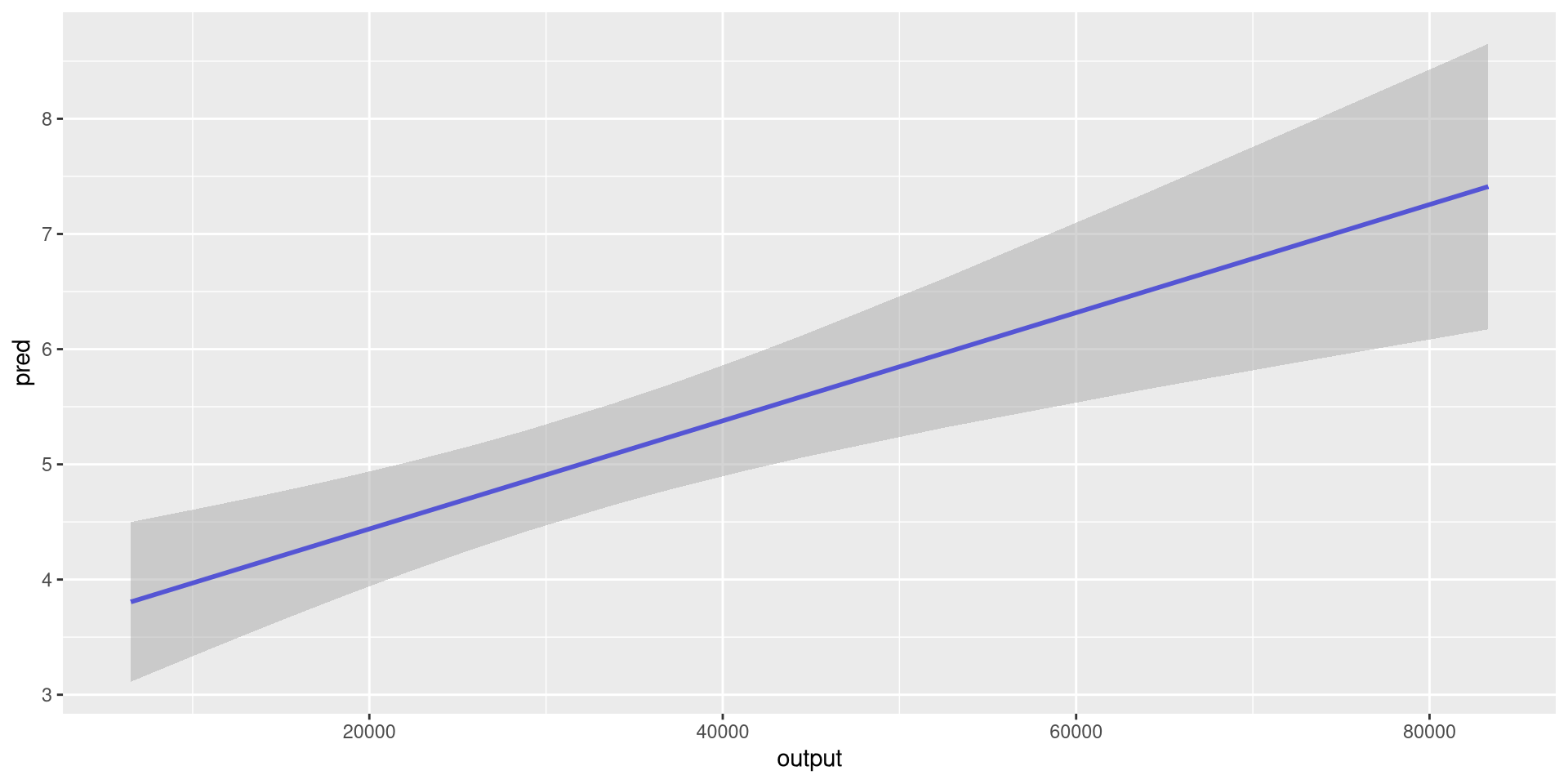
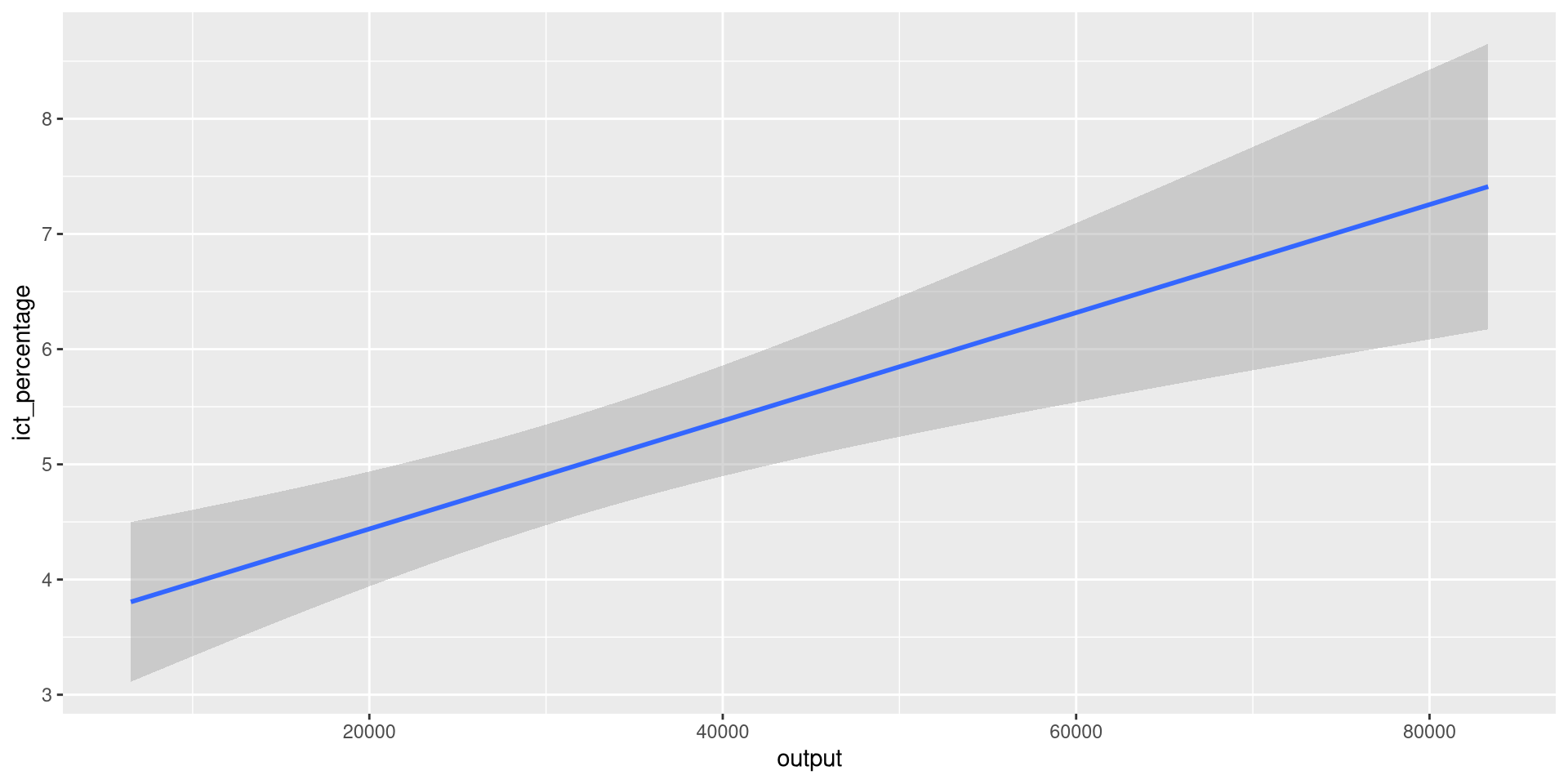
labs().geom_line().\[ f(x) = \sin(2x) + e^{-x/10} \cdot \cos(x) \]

ggplot2 writes the formula expression as a string in the vertical axis label.*, while in mathematical typography it is usually omitted.quote() in labs() to instruct ggplot2 to render the expression in a more human-customary way.ggplot2, annotations and text can be added with annotate() and geom_text().geom_text(): Example 1eu_ict’s scatter plot.geom_text(): Example 1eu_ict’s scatter plot.label = geo aesthetic to geom_text() to create a text object using country names.geom_text(): Example 1eu_ict’s scatter plot.geom_text() to filter only the non-EU countries.geom_text(): Example 1eu_ict’s scatter plot.hjust = "left" and vjust = "top" to align the text to the top-left corner.geom_text(): Example 1eu_ict’s scatter plot.nudge_y = -0.1 to move the text slightly below its data point.geom_text(): Example 1eu_ict’s scatter plot.size argument.geom_text(): Example 1eu_ict’s scatter plot.
geom_text(): Example 2
output value per group and use it as the x aesthetic in geom_text().geom_text(): Example 2slice_max() to pick the maximum output value per group.geom_text() to use the sliced data.geom_text(): Example 2
mapping argument of geom_text().geom_text(): Example 2ggplot(eu_ict, aes(output, ict_percentage)) +
geom_point(aes(color = income)) +
geom_smooth(
aes(group = EU), method = "lm", se = FALSE
) +
geom_text(
data = eu_ict |>
dplyr::group_by(EU) |>
dplyr::slice_max(output, n = 1),
aes(output, ict_percentage, label = EU),
hjust = "left",
vjust = "bottom",
nudge_x = 1000
)
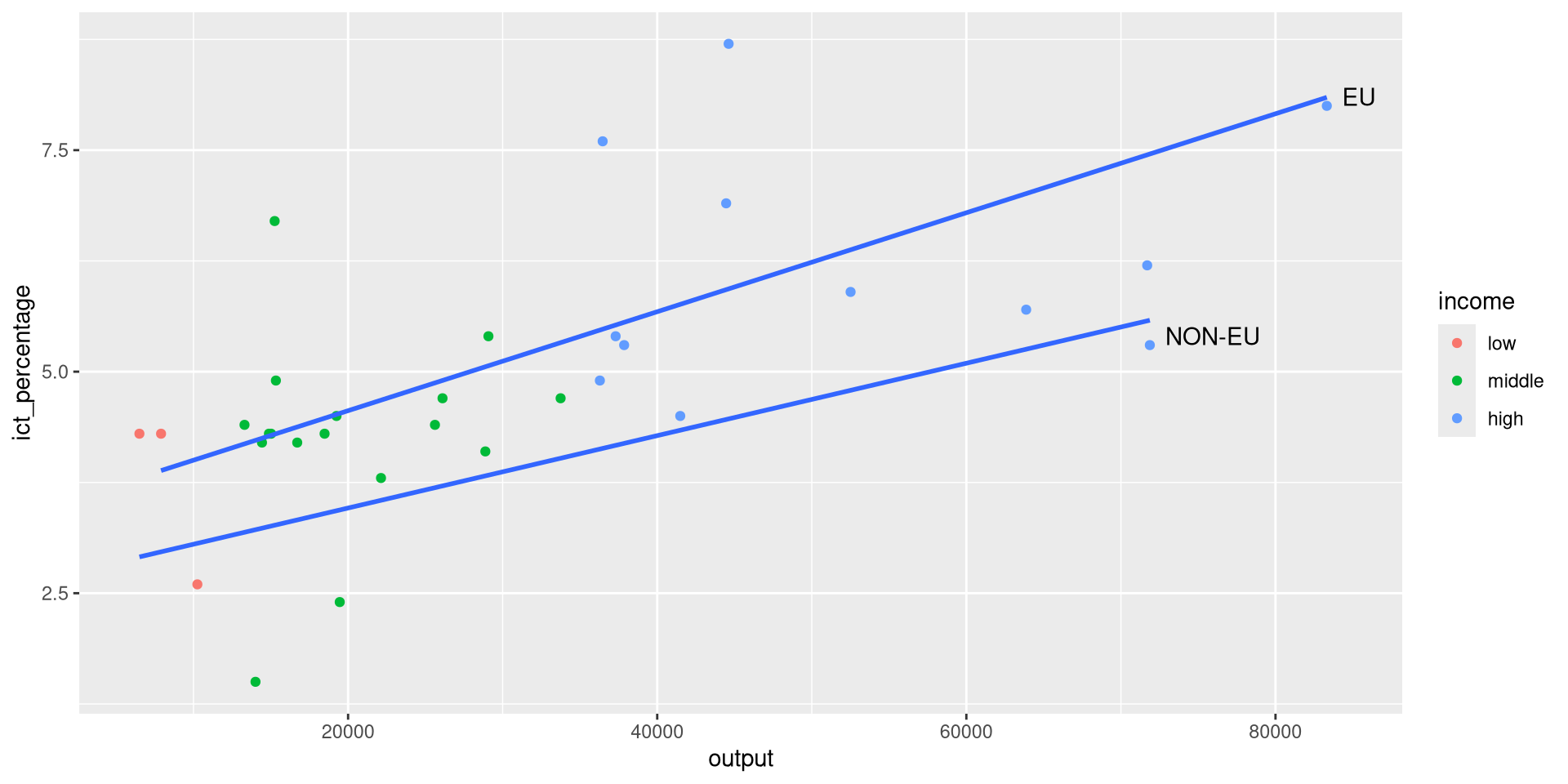
hjust, vjust, and nudge_x.annotate().geom_text(), which is a geometric object, annotate() does not act on data points.annotate() does not require a data argument.annotate() for textgeom_point() scatter plot of the eu_ict’s income data.annotate() for textannotate() for textannotate() of geometric type label.label text for the annotation.x and y arguments.annotate() for textannotate() for text
richest data to pass more information to annotate().annotate() for text
annotate() for text
annotate() function does not have nudge_* arguments (why?).x and y positions to move the label around.annotate() for textannotate() for textannotate() for segmentsannotate() is very useful for adding segments and arrows to a plot.annotate() for text.geom = "label", we use geom = "segment" to create annotations with segments and arrows.annotate() for segments
annotate() for segmentsrichest <- eu_ict |>
dplyr::filter(EU == "EU") |>
dplyr::slice_max(output, n = 1)
ggplot(eu_ict, aes(output, ict_percentage)) +
geom_point(aes(color = income, shape = EU)) +
annotate(
geom = "label",
label = richest$geo,
x = richest$output - 8000,
y = richest$ict_percentage,
hjust = "right"
) +
annotate(geom = "segment")annotate() layer with geom = "segment" to create a segment.annotate() for segmentsrichest <- eu_ict |>
dplyr::filter(EU == "EU") |>
dplyr::slice_max(output, n = 1)
ggplot(eu_ict, aes(output, ict_percentage)) +
geom_point(aes(color = income, shape = EU)) +
annotate(
geom = "label",
label = richest$geo,
x = richest$output - 8000,
y = richest$ict_percentage,
hjust = "right"
) +
annotate(geom = "segment")annotate() function expects two points to draw the segment.x, y, xend, and yend arguments.annotate() for segmentsrichest <- eu_ict |>
dplyr::filter(EU == "EU") |>
dplyr::slice_max(output, n = 1)
ggplot(eu_ict, aes(output, ict_percentage)) +
geom_point(aes(color = income, shape = EU)) +
annotate(
geom = "label",
label = richest$geo,
x = richest$output - 8000,
y = richest$ict_percentage,
hjust = "right",
) +
annotate(
geom = "segment",
x = richest$output - 8000,
xend = richest$output - 500,
y = richest$ict_percentage,
yend = richest$ict_percentage
)
annotate() for segmentsrichest <- eu_ict |>
dplyr::filter(EU == "EU") |>
dplyr::slice_max(output, n = 1)
ggplot(eu_ict, aes(output, ict_percentage)) +
geom_point(aes(color = income, shape = EU)) +
annotate(
geom = "label",
label = richest$geo,
x = richest$output - 8000,
y = richest$ict_percentage,
hjust = "right",
) +
annotate(
geom = "segment",
x = richest$output - 8000,
xend = richest$output - 500,
y = richest$ict_percentage,
yend = richest$ict_percentage,
arrow = arrow(type = "closed", length = unit(0.3, "cm"))
)
arrow argument.annotate() for segmentsrichest <- eu_ict |>
dplyr::filter(EU == "EU") |>
dplyr::slice_max(output, n = 1)
ggplot(eu_ict, aes(output, ict_percentage)) +
geom_point(aes(color = income, shape = EU)) +
annotate(
geom = "label",
label = richest$geo,
x = richest$output - 8000,
y = richest$ict_percentage,
hjust = "right",
) +
annotate(
geom = "segment",
x = richest$output - 8000,
xend = richest$output - 500,
y = richest$ict_percentage,
yend = richest$ict_percentage,
arrow = arrow(type = "closed", length = unit(0.3, "cm")),
color = "red"
)
color argument.